Relationship Operations
|
This is the documentation of the GraphQL Library version 7. For the long-term support (LTS) version 5, refer to GraphQL Library version 5 LTS. |
Relationships are a fundamental part of the Neo4j database, and the Neo4j GraphQL Library generates a comprehensive set of operations for working with them. These operations can be combined, enabling you to perform complex graph manipulations in a single mutation.
This page demonstrates the various relationship operations available and how to use them effectively in your GraphQL schema through a sequence of scenarios and equivalent mutations to update "the City database".
Data model
Consider the following data model graph:
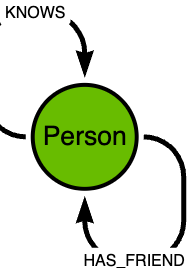
Writing type definitions
Define the nodes and relationships as described in the relationships page and make sure to include the relationship properties as needed.
KNOWS and HAS_FRIENDtype Person @node {
name: String!
friends: [Person!]! @relationship(type: "HAS_FRIEND", direction: OUT, properties: "Friendship")
acquaintances: [Person!]! @relationship(type: "KNOWS", direction: OUT)
}
type Friendship @relationshipProperties {
since: Int
}Queries
queryDirection
All relationships have a direction. However, when querying them, it is possible to perform undirected queries, that is, queries that ignore the relationship direction.
Use the argument queryDirection to control this behavior:
KNOWS relationship field with the queryDirection argumenttype Person @node {
name: String!
friends: [Person!]! @relationship(type: "HAS_FRIEND", direction: OUT)
acquaintances: [Person!]! @relationship(type: "KNOWS", direction: OUT, queryDirection: UNDIRECTED)
}queryDirection can have the following values:
-
DIRECTED: only directed queries can be performed on this relationship. This is the default value. -
UNDIRECTED: only undirected queries can be performed on this relationship.
Fetching your data
Consider the following sample data in the database:
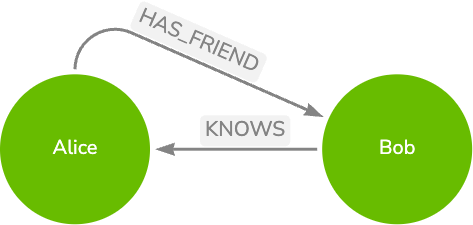
Using the updated type definition from queryDirection, notice the difference in the response when querying for both relationship fields:
friends takes into account the direction of the HAS_FRIEND relationship while acquaintances ignores the direction of the KNOWS relationship and returns all related nodes.
friends only applies from Alice to Bob, while acquaintances applies in both directionsquery {
people {
name
friends {
name
}
acquaintances {
name
}
}
}{
"data": {
"people": [
{
"name": "Alice",
"friends": [{ "name": "Bob" }],
"acquaintances": [{ "name": "Bob" }]
},
{
"name": "Bob",
"friends": [],
"acquaintances": [{ "name": "Alice" }]
}
]
}
}For Alice to be returned in Bob’s friends list, another relationship of type HAS_FRIEND, directed from Bob to Alice, must exit in the database.
HAS_FRIEND relationship from Bob to AliceSetup:
MATCH (alice:Person {name: "Alice"})
MATCH (bob:Person {name: "Bob"})
MERGE (bob)-[:HAS_FRIEND]->(alice)
Running the same query again now returns Alice in Bob’s friends list:
{
    "data": {
        "people": [
            {
                "name": "Alice",
                "friends": [{ "name": "Bob" }],
                "acquaintances": [{ "name": "Bob" }]
            },
            {
                "name": "Bob",
                "friends": [{ "name": "Alice" }],
                "acquaintances": [{ "name": "Alice" }]
            }
        ]
    }
}
In order to be traversable from both sides, directed relationships have to exist in each direction, while undirected relationships only have to exist in one direction.
Fetching your data using a connection query
The GraphQL library can generate connection fields for relationship fields, which allow you to query for relationship properties and other metadata about the relationship. These fields are compliant with the Relay-style connection specification.
The query in the following example requests the same data as above but using the connection fields for both relationships.
query {
    peopleConnection {
        edges {
            node {
                name
                friendsConnection {
                    edges {
                        node {
                            name
                        }
                        # can now request relationship properties
                        properties {
                            since
                        }
                    }
                }
                acquaintancesConnection {
                    edges {
                        node {
                            name
                        }
                    }
                }
            }
        }
    }
}|
The |
Mutations
The top level operations refer to nodes in the database. For the type definitions in Writing type definitions, the generated top level operations are:
createPeople(input: [PersonCreateInput!]!)!: CreatePeopleMutationResponse!
updatePeople(where: PersonWhere!, update: PersonUpdateInput!)!: UpdatePeopleMutationResponse!
deletePeople(where: PersonWhere!, delete: PersonDeleteInput!)!: DeleteInfo!
As arguments to the top level operations, the Neo4j GraphQL Library generates a set of nested operations which manage the relationships between the nodes in the database.
|
Terminology
|
The nested operations are:
-
The
createoperation creates the target node, together with the relationship between the source and target nodes in the same operation. -
The
connectoperation only creates the relationship between the source node and target nodes that already exist in the database. -
The
deleteoperation deletes the target node, together with all relationships connected to it. -
The
disconnectoperation only deletes the relationship between the source node and the target node, without deleting either of the nodes. -
The
updateoperation updates the properties of the target node, as well as the relationship between the source and target nodes.
Each of the top level operations support their own set of nested operations:
HAS_FRIEND# Top level create operation supports nested:
# * create
# * connect
input PersonCreateInput {
# ...other fields
friends: PersonFriendsFieldInput
}
input PersonFriendsFieldInput {
connect : [PersonFriendsConnectFieldInput!]
create : [PersonFriendsCreateFieldInput!]
}
# Top level update operation supports nested:
# * create
# * connect
# * update
# * disconnect
# * delete
input PersonUpdateInput {
# ...other fields
friends: [PersonFriendsUpdateFieldInput!]
}
input PersonFriendsUpdateFieldInput {
connect : [PersonFriendsConnectFieldInput!]
create : [PersonFriendsCreateFieldInput!]
delete : [PersonFriendsDeleteFieldInput!]
disconnect : [PersonFriendsDisconnectFieldInput!]
update : PersonFriendsUpdateConnectionInput
}
# Top level delete operation supports nested:
# * delete
input PersonDeleteInput {
# ...other fields
friends: [PersonFriendsDeleteFieldInput!]
}
input PersonFriendsDeleteFieldInput {
delete: PersonDeleteInput
}Create and connect
Consider the following scenario: Bob goes to a party where he meets Charlie and Dave. When asked, Charlie says he considers Bob to be a friend, but Dave spoke too little so he is just an acquaintance for now.
Charlie is not in the database so the Person node needs to be created.
This indicates that the create top level operation can be used.
Note that when querying, the acquaintances relationship is undirected, so when Charlie says he became acquainted with Dave, the reverse is also true without needing to run another query.
mutation {
    createPeople(input: [{
        name: "Charlie",
        # Charlie is the source node
        # creates the relationship HAS_FRIEND
        friends: { connect: { where: { node: { name: { eq: "Bob" } } } } },
        # creates the node Dave and the relationship KNOWS
        acquaintances: { create: { node: { name: "Dave" } } }
    }]) {
        people {
            name
            friends {
                name
            }
            acquaintances {
                name
            }
        }
    }
}
Consider the following: Bob shares Charlie’s sentiment and also considers him a friend while Dave is an acquaintance.
Bob’s node exists in the database so his node has to be updated to reflect these new relationships.
This indicates a use case for the top-level update operation.
mutation {
    updatePeople(
        where: { name: "Bob" },
        update: {
            # Bob is the source node
            friends: {
                connect: { where: { node: { name: { eq: "Charlie" } } } },
                create: { node: { name: "Camilla" } }
            },
            acquaintances: { connect: { where: { node: { name: { eq: "Dave" } } } } }
        }
    ) {
        people {
            name
            friends {
                name
            }
            acquaintances {
                name
            }
        }
    }
}
Update
Consider the following scenario: Bob and Camilla are getting married and changing their last names to B.
Both nodes already exist in the database, indicating a use case for the top level update operation.
Since their nodes are related through the friends relationship, you can perform both changes in the same mutation starting with a top level update operation.
|
Caveat: the database only contains one Read along the |
mutation {
    updatePeople(
        where: { name: { eq: "Bob" } },
        update: {
            # update Bob node's fields
            name: { set: "Bob B." },
            # Bob is the source node
            friends: [{
                update: {
                    # Camilla is the target node
                    where: {
                        node: { name: { eq: "Camilla" } },
                    },
                    # update Camilla node's fields
                    node: { name: { set: "Camilla B." } },
                    # update the relationship between Bob and Camilla
                    edge: { since: { set: 2022 } },
                },
            }],
        }
    ) {
    info {
        nodesCreated
        relationshipsCreated
    }
  }
}
Delete and disconnect
Consider the following scenario: Alice notified everyone at the party that she moving away. Bob did not like how Charlie behaved at hearing the news and wants to cut ties with him.
Alice’s node must be deleted from the database, indicating a use case for the top level delete operation.
However, both actions of the scenario have Bob in common, so a valid alternative is a top level update operation on Bob’s node with nested operations to perform the correct changes on Alice and Charlie nodes.
Note that this is only possible because Bob has relationships to both.
There must be a relationship of type HAS_FRIEND from Bob to Alice in order for the node Alice to meet the filter criteria for the nested delete operation, and the same for Charlie and the nested disconnect operation.
mutation {
    updatePeople(
        where: { name:  { eq: "Bob B." } },
        update: {
            # Bob B. is the source node
            friends: [
                {
                    # deletes Alice and all relationships between Alice and all other nodes (including the KNOWS relationships)
                    delete: [ { where: { node: { name: { eq: "Alice" } } } } ],
                },
                {
                    # deletes the relationship between Bob B. and Charlie, without deleting either node
                    disconnect: [ { where: { node: { name: { eq: "Charlie" } } } } ],
                },
            ],
        }
    ) {
    info {
      nodesDeleted
      relationshipsDeleted
    }
  }
}
Consider also: Bob and Camilla are moving away together.
Both nodes need to be deleted, together with all relationships connected to them, indicating a use case for the top level delete operation.
Since the nodes are related through the friends relationship, both deletions can be performed in the same mutation starting with a delete operation.
Similar to the Update section, there is a caveat:
the database only contains one friends relationship, from Bob to Camilla.
This means that the top level delete operation must be performed on Bob’s node, as Camilla’s node does not meet the filter criteria for the nested delete operation.
Here’s the outcome of running the same mutation in both directions:
mutation {
    deletePeople(
        # deletes Camilla and all relationships between Camilla and all other nodes
        where: { name: { eq: "Camilla B." } },
        delete: {
            # Camilla is the source node
            friends: [
                {
                    # no relationship of type HAS_FRIEND matching this criteria exists
                    where: { node: { name: { eq: "Bob B." } } }
                },
            ],
        }
    ) {
    nodesDeleted
    relationshipsDeleted
  }
}
This results in the deletion of Camilla node and the relationship between Bob and Camilla:
{
  "data": {
    "deletePeople": {
      "nodesDeleted": 1,
      "relationshipsDeleted": 1
    }
  }
}mutation {
deletePeople(
# deletes Bob and all relationships between Bob and all other nodes
where: { name: { eq: "Bob B." } },
delete: {
# Bob is the source node
friends: [
{
# deletes Camilla and all relationships between Camilla and all other nodes (including the KNOWS relationships)
where: { node: { name: { eq: "Camilla B." } } }
},
],
}
) {
nodesDeleted
relationshipsDeleted
}
}This results in the deletion of both Bob’s and Camilla’s nodes and the relationship between them:
{
  "data": {
    "deletePeople": {
      "nodesDeleted": 2,
      "relationshipsDeleted": 1
    }
  }
}
Read along the queryDirection and mutations section to understand how the queryDirection argument of the @relationship directive affects the outcome of these mutations.
queryDirection and mutations
The queryDirection argument of the @relationship directive affects database queries.
In terms of GraphQL operations this means that both queries and mutations are affected by its value.
|
When performing mutations, the nodes and relationships specified in the mutation input must be queried from the database first. That is when the |
For a similar mutation to Top level delete with nested delete operation matching the correct node but with an acquaintances instead of friends relationship from Bob to Camilla, the outcome changes as follows:
Setup:
CREATE (bob:Person {name: "Bob B."})
CREATE (camilla:Person {name: "Camilla B."})
MERGE (bob)-[:KNOWS]->(camilla)
Mutation:
mutation {
    deletePeople(
        # deletes Camilla and all relationships between Camilla and all other nodes
        where: { name: { eq: "Camilla B." } },
        delete: {
            # Camilla is the source node
            acquaintances: [
                {
                    # because the relationship is undirected, this filter matches the relationship between Bob and Camilla, even if it is directed from Bob to Camilla in the database
                    where: { node: { name: { eq: "Bob B." } } }
                },
            ],
        }
    ) {
    nodesDeleted
    relationshipsDeleted
  }
}
This results the deletion of both Bob’s and Camilla’s node and the relationship between them:
{
  "data": {
    "deletePeople": {
      "nodesDeleted": 2,
      "relationshipsDeleted": 1
    }
  }
}