Exploring a graph dataset
Once the transformation is complete, you can explore the graph with the Bloom button on the Fabric ribbon. Bloom in Fabric offers the same functionality as Bloom in the Aura console.
A graph puts information into context. People, places, and things. Products, services, and accounts. Transactions, identities, and events. Bloom shows the patterns you intuitively know are there in your data, and reveals new patterns you may not have expected.
The core set of Bloom features are:
-
Perspective - the lens through which you view graph data, can be customized for different business purposes. See Aura Documentation → Perspectives for more information.
-
Visualization - high performance, GPU-powered physics and rendering.
-
Exploration - directly interacts with the data to explore connections and details.
-
Editing - create records, connect data, update information.
-
Inspection - see all the record details and browse to connected records.
-
Search - find information, using advanced near-natural language Search phrases. See Aura Documentation → Search bar.
Bloom overview
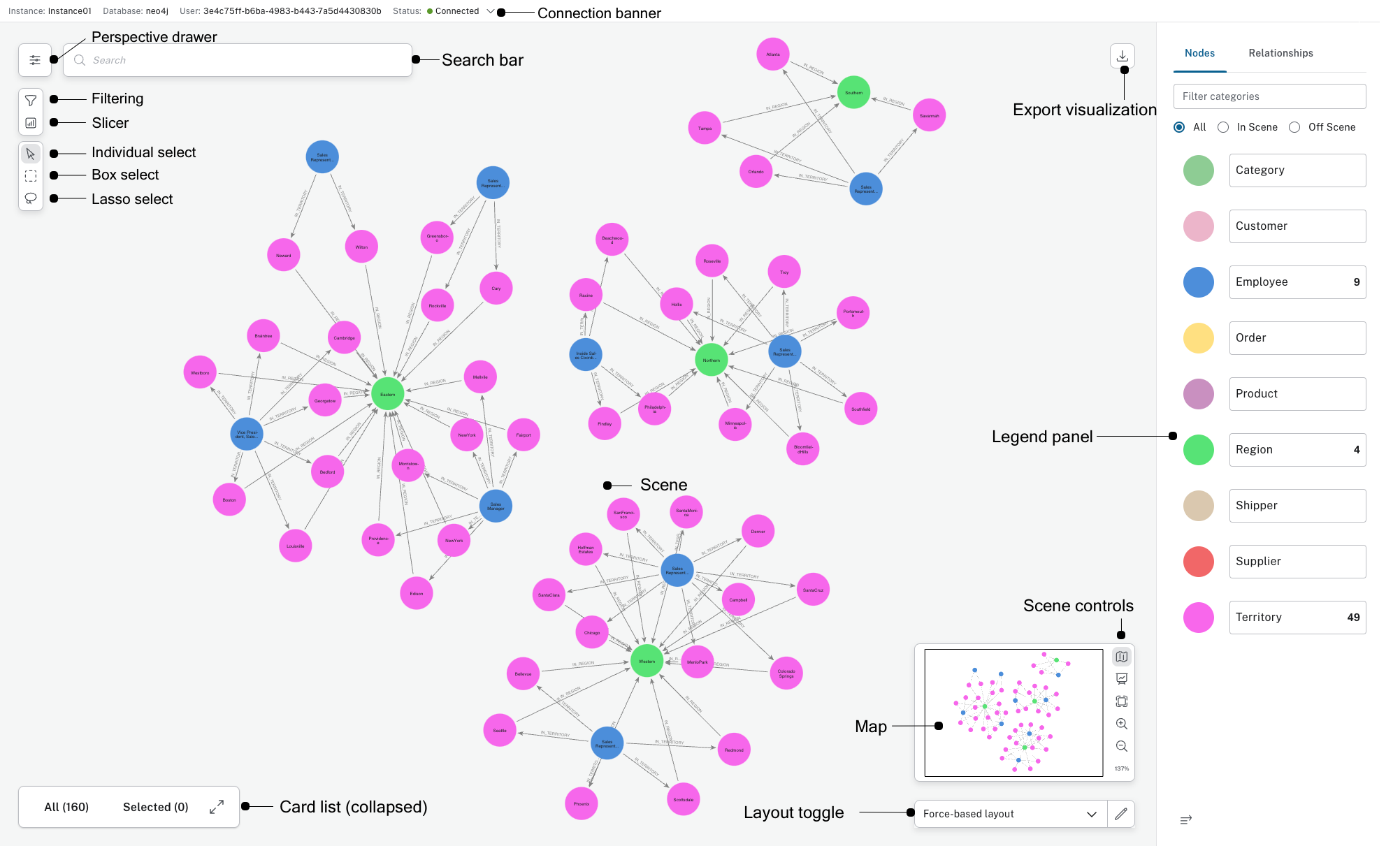
Perspective drawer
The Perspective drawer is where you can define the business context depicted in the scene. See Aura Documentation - > Perspective drawer for more information.
Scene
Bloom’s main workspace is a graph scene, where you’ll see the graph visualization. The scene contains just the parts of the graph which you’ve found through search or exploration.
Click directly on nodes to move them manually into place. Right-click on nodes, relationships, or the background to bring up context menus to perform actions. See Aura Documentation → Scene interactions for more information.
To export your current scene, click the Export visualization icon in the upper right corner of your screen.
You may either take a screenshot and save as a .png, export the contents as CSV or share the Scene.
Overlays
Overlays provide supplemental views for working with the graph scene.
-
Legend panel - shows all the business entities (categories and relationship types) available in the current Perspective. This panel also lets you define the style for categories and relationship types using default or rule-based styles.
-
Search bar - accepts a near-natural language search query input and offers suggestions on graph patterns that match the input.
-
Card list - shows details about the nodes and relationships in the scene.
For more information Bloom, see Aura Documentation → Bloom.