Map expressions
Example graph
The following graph is used for the examples below:
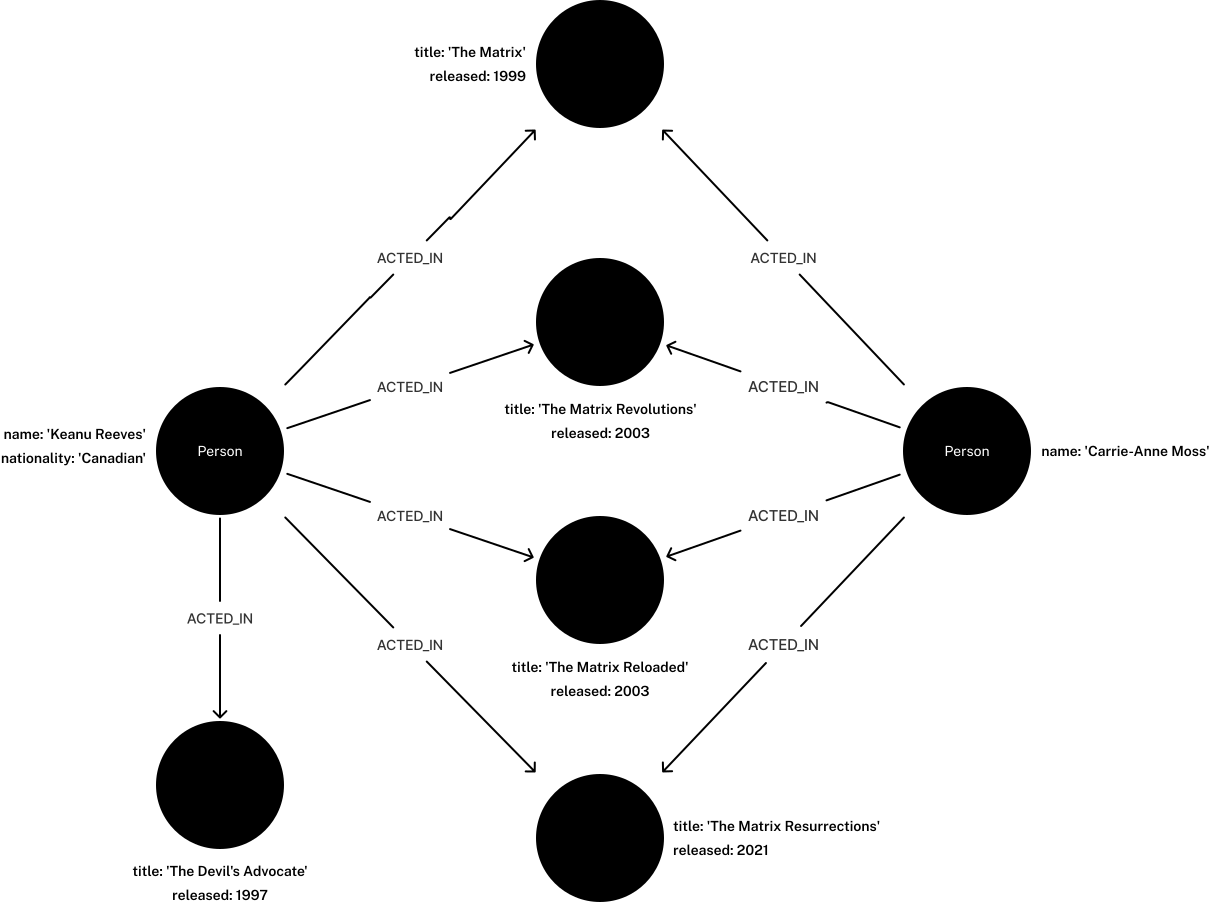
To recreate the graph, run the following query against an empty Neo4j database:
CREATE (keanu:Person {name: 'Keanu Reeves', nationality: 'Canadian'}),
       (carrieAnne:Person {name: 'Carrie-Anne Moss'}),
       (theMatrixRevolutions:Movie {title: 'The Matrix Revolutions', released: 2003}),
       (theMatrixReloaded:Movie {title: 'The Matrix Reloaded', released: 2003}),
       (theMatrix:Movie {title: 'The Matrix', released: 1999}),
       (theDevilsAdvocate:Movie {title: 'The Devils Advocate', released: 1997}),
       (theMatrixResurrections:Movie {title: 'The Matrix Resurrections', released: 2021}),

       (keanu)-[:ACTED_IN]->(theMatrix),
       (keanu)-[:ACTED_IN]->(theMatrixRevolutions),
       (keanu)-[:ACTED_IN]->(theMatrixReloaded),
       (keanu)-[:ACTED_IN]->(theMatrixResurrections),
       (keanu)-[:ACTED_IN]->(theDevilsAdvocate),

       (carrieAnne)-[:ACTED_IN]->(theMatrix),
       (carrieAnne)-[:ACTED_IN]->(theMatrixRevolutions),
       (carrieAnne)-[:ACTED_IN]->(theMatrixReloaded),
       (carrieAnne)-[:ACTED_IN]->(theMatrixResurrections)
Map operators
Cypher contains two map operators:
-
Statically access a value by key: dot operator (
.). -
Dynamically access a value by key: subscript operator (
[]).
Statically access a MAP value
MAP values can be accessed statically by specifying a key after the . operator.
MAP value accessWITH {a: 10, b: 20, c: 30} AS map
RETURN map.a AS firstValue,
map.c AS lastValue| firstValue | lastValue |
|---|---|
|
|
Rows: 1 |
|
To statically access a value in a nested MAP, use chained . operators.
Each . operator traverses one level deeper into the nested structure.
MAP valueWITH {a: 10, b: 20, c: 30, innerMap: {x: 100, y: 200, z: 300}} AS map
RETURN map.a AS firstOuterValue,
map.innerMap.y AS secondInnerValue| firstOuterValue | secondInnerValue |
|---|---|
|
|
Rows: 1 |
|
Node and relationship properties are stored as key-value pairs in a MAP.
Properties can, therefore, be statically accessed using the . operator.
MATCH (p:Person)
RETURN p AS nodePropertyMaps,
p.name AS accessedMapValue| nodePropertyMaps | accessedMapValue |
|---|---|
|
|
|
|
Rows: 2 |
|
Dynamically access a MAP value
To dynamically access a MAP value, use the subscript operator, [].
The key can be provided by a variable or a parameter.
MAP value using a variableWITH {a: 10, b: 20, c: 30} AS map,
'a' AS dynamicKey
RETURN map[dynamicKey] AS dynamicValue| dynamicValue |
|---|
|
Rows: 1 |
{
  "dynamicKey" : "a"
}MAP value using a parameterWITH {a: 10, b: 20, c: 30} AS map
RETURN map[$dynamicKey] AS dynamicValue| dynamicValue |
|---|
|
Rows: 1 |
MAP valueWITH {a: 10, b: 20, c: 30, innerMap: {x: 100, y: 200, z: 300}} AS map,
'z' AS dynamicInnerKey
RETURN map.innerMap[dynamicInnerKey] AS dynamicInnerValue| dynamicInnerValue |
|---|
|
Rows: 1 |
It is possible to dynamically access multiple values from a MAP by using list comprehension.
This query iterates over the LIST dynamicKeys and retrieves their corresponding values from the map.
MAP value access and list comprehensionWITH {a: 10, b: 20, c: 30} AS map,
['a', 'c'] AS dynamicKeys
RETURN [key IN dynamicKeys | map[key]] AS dynamicValue| dynamicValue |
|---|
|
Rows: 1 |
MATCH (p:Person)
LET dynamicValue = 'name'
RETURN p[dynamicValue] AS names| names |
|---|
|
|
Rows: 2 |
Referencing a non-existent key in the MAP with the [] operator will return null.
MAP keyWITH {a: 10, b: 20, c: 30} AS map,
'z' AS dynamicKey
RETURN map[dynamicKey] AS dynamicValue| dynamicValue |
|---|
|
Rows: 1 |
Map projection
Cypher supports map projections, which allow the creation of MAP values from nodes, relationships, and other MAP values.
A map projection begins with the variable bound to the MAP to be projected from, and contains a body of comma-separated MAP keys, enclosed by curly braces, {}.
Each map element specifies a key-value pair that is included in the resulting map projection.
mapVariable {mapElement [, ...n]}mapElement can be one of the following:
-
An key selector that references a key in a
MAPand pulls the corresponding value. -
A literal entry that uses a custom key-value pair where the key is specified and the value is defined using an expression.
-
A variable selector that projects the value of a variable, using the variable name as the key, and the value it references as the value.
-
An all-map projection that projects all key-value pairs from
mapVariable.
The key names in a map must be of type STRING.If mapVariable is null, the projection evaluates to null.
|
Map projections with a key selector are useful when you need to extract specific key-value pairs from a MAP.
WITH {a: 10, b: 20, c: 30} AS map
RETURN map{.a, .c} AS projectedMap| projectedMap |
|---|
|
Rows: 1 |
In the below query, a map projection with property selectors is used to collect only the title and release year of each movie.
MATCH (p:Person)-[:ACTED_IN]->(m:Movie)
RETURN p.name AS actor, collect(m{.title, .released}) AS movies| actor | movies |
|---|---|
|
|
|
|
Rows: 2 |
|
Map projections with a literal entry are useful when you want to add custom values to a projected MAP value without modifying the original data structure.
WITH {a: 10, b: 20, c: 30} AS map
RETURN map{a: map.a, valueSum: map.a + map.b + map.c} AS projectedMap| projectedMap |
|---|
|
Rows: 1 |
This query uses a map projection with a literal entry, where the size(movies) expression calculates the total number of movies Keanu Reeves has acted in.
MATCH (keanu:Person {name: 'Keanu Reeves'})-[:ACTED_IN]->(movie:Movie)
WITH keanu, collect(movie) AS movies
RETURN keanu {.name, totalMovies: size(movies)} AS keanuDetails| keanuDetails |
|---|
|
Rows: 1 |
Map projection with a variable selector is useful when you want to project values based on a variable name.
MATCH (keanu:Person {name: 'Keanu Reeves'})
LET dob = date('1964-09-02'), birthPlace =  'Beirut, Lebanon'
RETURN keanu{.name, dob, birthPlace} AS projectedKeanu| projectedKeanu |
|---|
|
Rows: 1 |
The below query finds all Person nodes in the graph that have one or more relationships with the type ACTED_IN connected to Movie nodes.
It uses the count() function to count how many Movie nodes are connected to each Person node in this way, and uses a variable selector to project the value of the count.
MATCH (actor:Person)-[:ACTED_IN]->(movie:Movie)
WITH actor, count(movie) AS totalMovies
RETURN actor{totalMovies, .name} AS nameAndMovies| nameAndMovies |
|---|
|
|
Rows: 2 |
Map projection with an all-map projection is useful when you want to project all key-value pairs from a MAP without explicitly listing them.
WITH {a: 10, b: 20, c: 30} AS map
RETURN map{.*} AS projectedMap| projectedMap |
|---|
|
Rows: 1 |
The below query returns all properties from the Keanu Reeves node.
An all-map selector is used to project all the node properties.
MATCH (keanu:Person {name: 'Keanu Reeves'})
RETURN keanu{.*} AS allKeanuProperties| AllKeanuProperties |
|---|
|
Rows: 1 |
Map comprehensionCypher 25 onlyIntroduced in Neo4j 2026.09
Map comprehension is used to create new MAP values by iterating over the elements of an existing MAP or LIST, and transforming them into key-value pairs.
The result is a new MAP where each entry is generated by the specified key and value expressions.
Map comprehension follows a similar syntax to list comprehension.
{key: value IN map [WHERE predicate] | keyExpression : valueExpression}The iteration step (key: value IN map) ensures that each key, value pair in a map is accessed one by one, while the keyExpression and valueExpression optionally applies a transformation to each item, creating new MAP of key, value pairs containing the modified elements.
{item IN list [WHERE predicate] | keyExpression : valueExpression}The iteration step (item IN list) ensures that each element of a list is accessed one by one, while the keyExpression and valueExpression apply a transformation to each item, creating new MAP of key-value pairs containing the modified elements.
Variables introduced inside a map comprehension (such as |
As |
Unlike list comprehension, the |
The |
WITH {a: 1, b: 2, c: 3} AS map
RETURN {k: v IN map | k : v * 10} AS result| result |
|---|
|
Rows: 1 |
MAPWITH {a: 1, b: 2, c: 3, d: null, e: null} AS map
RETURN {k: v IN map WHERE v IS NOT NULL | k : v} AS result| result |
|---|
|
Rows: 1 |
WITH {a: 1, b: 2, c: 3} AS map
RETURN {k: v IN map | 'a' : v * 10} AS result| result |
|---|
|
Rows: 1 |
The value in the result comes from whichever MAP entry is processed last (in this case, {a:30}).
That entry is not guaranteed, however, because Cypher does not define an order in which MAP entries are processed.
WITH {a: {aa: 1, ab: 2}, b: {ba: 1, bb: 2}} AS nestedMap
RETURN {k: v IN nestedMap | k : {innerK: innerV IN v | innerK : innerV * 10}} AS result| result |
|---|
|
Rows: 1 |
WITH ['a', 'b', 'c'] AS list
RETURN {item IN list | item : item + '!' } AS result| result |
|---|
|
Rows: 1 |
LIST and transform into a MAPWITH range(0, 10) AS list
RETURN {i IN list WHERE i % 2 = 0 | toString(i) : i * 10} AS result| result |
|---|
|
Rows: 1 |