K-1 Coloring
Glossary
- Directed
-
Directed trait. The algorithm is well-defined on a directed graph.
- Undirected
-
Undirected trait. The algorithm is well-defined on an undirected graph.
- Heterogeneous nodes
-
Heterogeneous nodes fully supported. The algorithm has the ability to distinguish between nodes of different types.
- Heterogeneous relationships
-
Heterogeneous relationships fully supported. The algorithm has the ability to distinguish between relationships of different types.
- Weighted relationships
-
Weighted trait. The algorithm supports a relationship property to be used as weight, specified via the relationshipWeightProperty configuration parameter.
- Node properties
-
Node properties trait. The algorithm makes use of node properties.
- CPU
-
The algorithm runs on CPU compute pools.
- GPU
-
The algorithm runs on GPU compute pools.
Introduction
The K-1 Coloring algorithm assigns a color to every node in the graph, trying to optimize for two objectives:
-
To make sure that every neighbor of a given node has a different color than the node itself.
-
To use as few colors as possible.
Note that the graph coloring problem is proven to be NP-complete, which makes it intractable on anything but trivial graph sizes. For that reason the implemented algorithm is a greedy algorithm. Thus it is neither guaranteed that the result is an optimal solution, using as few colors as theoretically possible, nor does it always produce a correct result where no two neighboring nodes have different colors. However the precision of the latter can be controlled by the number of iterations this algorithm runs.
For more information on this algorithm, see:
Syntax
This section covers the syntax used to execute the K-1 Coloring algorithm.
CALL Neo4j_Graph_Analytics.graph.k1coloring(
  'CPU_X64_XS',                    (1)
  {
    ['defaultTablePrefix': '...',] (2)
    'project': {...},              (3)
    'compute': {...},              (4)
    'write':   {...}               (5)
  }
);| 1 | Compute pool selector. |
| 2 | Optional prefix for table references. |
| 3 | Project config. |
| 4 | Compute config. |
| 5 | Write config. |
| Name | Type | Default | Optional | Description |
|---|---|---|---|---|
computePoolSelector |
String |
|
no |
The selector for the compute pool on which to run the K-1 Coloring job. |
configuration |
Map |
|
no |
Configuration for graph project, algorithm compute and result write back. |
The configuration map consists of the following three entries.
| For more details on below Project configuration, refer to the Project documentation. |
| Name | Type |
|---|---|
nodeTables |
List of node tables. |
relationshipTables |
Map of relationship types to relationship tables. |
| Name | Type | Default | Optional | Description |
|---|---|---|---|---|
resultProperty |
String |
|
yes |
The node property that will be written back to the Snowflake database. |
maxIterations |
Integer |
|
yes |
The maximum number of iterations of K-1 Coloring to run. |
| For more details on below Write configuration, refer to the Write documentation. |
| Name | Type | Default | Optional | Description |
|---|---|---|---|---|
nodeLabel |
String |
|
no |
Node label in the in-memory graph from which to write a node property. |
nodeProperty |
String |
|
yes |
The node property that will be written back to the Snowflake database. |
outputTable |
String |
|
no |
Table in Snowflake database to which node properties are written. |
Examples
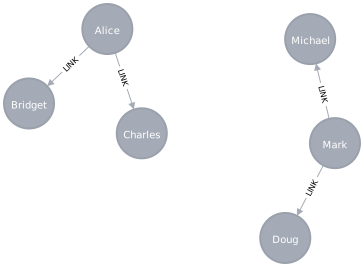
In this section we will show examples of running the K-1 Coloring algorithm on a concrete graph. The intention is to illustrate what the results look like and to provide a guide in how to make use of the algorithm in a real setting. We will do this on a small user network graph of a handful nodes connected in a particular pattern.
The example graph looks like this:
CREATE OR REPLACE TABLE EXAMPLE_DB.DATA_SCHEMA.USERS (NODEID VARCHAR);
INSERT INTO EXAMPLE_DB.DATA_SCHEMA.USERS VALUES
  ('Alice'),
  ('Bridget'),
  ('Charles'),
  ('Doug'),
  ('Mark'),
  ('Michael');

CREATE OR REPLACE TABLE EXAMPLE_DB.DATA_SCHEMA.LINKS (SOURCENODEID VARCHAR, TARGETNODEID VARCHAR);
INSERT INTO EXAMPLE_DB.DATA_SCHEMA.LINKS VALUES
  ('Alice', 'Bridget'),
  ('Alice', 'Charles'),
  ('Mark',  'Doug'),
  ('Mark',  'Michael');
This graph has two connected components, each with three nodes.
In each component one node ("Alice" and "Mark") is connected to the other two.
It should therefore not be possible for the neighbors of these nodes to be assigned the same color as them.
The relationships have a property weight, which is not used by the K-1 Coloring algorithm.
In the following examples we will demonstrate using the K-1 Coloring algorithm on this graph.
Run job
Running a K-1 Coloring job involves the three steps: Project, Compute and Write.
To run the query, there is a required setup of grants for the application, your consumer role and your environment. Please see the Getting started page for more on this.
We also assume that the application name is the default Neo4j_Graph_Analytics. If you chose a different app name during installation, please replace it with that.
CALL Neo4j_Graph_Analytics.graph.k1coloring('CPU_X64_XS', {
  'defaultTablePrefix': 'EXAMPLE_DB.DATA_SCHEMA',
  'project': {
    'nodeTables': ['USERS'],
    'relationshipTables': {
      'LINKS': {
        'sourceTable': 'USERS',
        'targetTable': 'USERS'
      }
    }
  },
  'compute': {},
  'write': [
    {
      'nodeLabel': 'USERS',
      'outputTable': 'USERS_COLORS'
    }
  ]
});| JOB_ID | JOB_STATUS | JOB_START | JOB_END | JOB_RESULT |
|---|---|---|---|---|
job_6a1f0c2be3d74c5e9f1b7d8a42c05e17 |
SUCCESS |
2025-09-10 09:14:21.412000 |
2025-09-10 09:14:28.036000 |
{
    "k1coloring_1": {
      "colorCount": 2,
      "computeMillis": 28,
      "configuration": {
        "batchSize": 10000,
        "concurrency": 2,
        "maxIterations": 10,
        "nodeLabels": [
          "*"
        ],
        "relationshipTypes": [
          "*"
        ],
        "resultProperty": "color"
      },
      "didConverge": true,
      "nodeCount": 6,
      "ranIterations": 2
    },
    "project_graph_1": {
      "graphName": "snowgraph",
      "nodeCount": 6,
      "nodeLabels": {
        "USERS": {
          "count": 6,
          "nodeId": {
            "dataType": "STRING"
          },
          "properties": {},
          "table": "EXAMPLE_DB.DATA_SCHEMA.USERS"
        }
      },
      "nodeMillis": 550,
      "relationshipCount": 4,
      "relationshipMillis": 861,
      "relationshipTypes": {
        "LINKS": {
          "count": 4,
          "direction": "DIRECTED",
          "properties": {},
          "sourceTable": "EXAMPLE_DB.DATA_SCHEMA.USERS",
          "targetTable": "EXAMPLE_DB.DATA_SCHEMA.USERS"
        }
      },
      "totalMillis": 1411
    },
    "write_node_property_1": {
      "copyIntoTableMillis": 1049,
      "nodeLabel": "USERS",
      "nodeProperty": "color",
      "outputTable": "EXAMPLE_DB.DATA_SCHEMA.USERS_COLORS",
      "rowsWritten": 6,
      "stageUploadMillis": 2533,
      "writeMillis": 3858
    }
} |
The returned result contains information about the job execution and the coloring. In this example the algorithm used two colors, converged after a single iteration, and found a correct coloring. Additionally, the color of each of the nodes has been written back to the Snowflake database. We can query it like so:
SELECT * FROM EXAMPLE_DB.DATA_SCHEMA.USERS_COLORS;| NODEID | COLOR |
|---|---|
Alice |
0 |
Bridget |
1 |
Charles |
1 |
Doug |
1 |
Mark |
0 |
Michael |
1 |
The result shows that every node differs in color from its neighbors, using only two colors. Bridget and Charles are not connected to each other, so they can share a color, and the same holds for Doug and Michael. Since the two components are not connected, they can also reuse the same colors.
|
The actual color values may differ, because the order of nodes projected in the in-memory graph is not guaranteed. It is equally plausible to get a different assignment, as long as no two connected nodes share a color. |
Limiting the number of iterations
Since the algorithm is greedy, it may need more than one iteration to resolve all color conflicts between neighboring nodes.
We can limit the number of iterations with the maxIterations configuration parameter.
If the limit is reached before the coloring is correct, didConverge is false in the result, and the written colors may still assign the same color to some neighboring nodes.
CALL Neo4j_Graph_Analytics.graph.k1coloring('CPU_X64_XS', {
  'defaultTablePrefix': 'EXAMPLE_DB.DATA_SCHEMA',
  'project': {
    'nodeTables': ['USERS'],
    'relationshipTables': {
      'LINKS': {
        'sourceTable': 'USERS',
        'targetTable': 'USERS'
      }
    }
  },
  'compute': {
    'maxIterations': 5,
    'resultProperty': 'k1coloring'
  },
  'write': [
    {
      'nodeLabel': 'USERS',
      'nodeProperty': 'k1coloring',
      'outputTable': 'USERS_COLORS'
    }
  ]
});
The results have the same shape as above, with the maxIterations value of 5 reflected in the returned configuration, and the colors written to the K1COLORING column of the output table.