Connectivity architecture patterns
Choosing a pattern
Exposing Neo4j on Kubernetes requires configuring two network connectors: HTTPS for Neo4j Browser, Bloom, NeoDash, REST API and Bolt for drivers, ETL tools, and microservices. See Configure network connectors for details.
These connectivity paths can be can be configured independently. The combination of choices for HTTPS and Bolt determines your connectivity architecture pattern.
HTTPS and Bolt exposure
For information about configuring SSL/TLS policies in a Neo4j Kubernetes deployment, see Configuring SSL.
HTTPS provides access to Neo4j Browser, Bloom, NeoDash, REST API, and any HTTP-based client.
| Pattern | Port | TLS handled by | WAF / L7 policies | Ingress requirement | Notes |
|---|---|---|---|---|---|
LoadBalancer |
|
Neo4j |
N/A |
Simplest setup; Neo4j is directly exposed. |
|
Ingress with TLS Passthrough |
|
Neo4j |
TLS passthrough |
End-to-end encryption; certificates are managed by Neo4j. |
|
Ingress with TLS Termination |
|
Ingress (cert-manager) |
HTTPS routing |
Centralized certificate management; this method is recommended for most setups. |
|
Reverse Proxy |
|
Ingress or LoadBalancer |
N/A |
Single port; also handles Bolt over WSS (JS driver only) |
|
Query API |
|
Ingress or Proxy |
HTTPS routing |
Limited driver support; no Bolt needed |
Bolt protocol provides connectivity for Neo4j drivers (Python, Java, Go, .NET, and JavaScript), ETL tools, and microservices.
| Pattern | Port | TLS handled by | WAF / L7 policies | Ingress requirement | Clients | Notes |
|---|---|---|---|---|---|---|
LoadBalancer |
|
Neo4j |
N/A |
All drivers |
Can be private/internal LoadBalancer. |
|
Ingress with TLS Passthrough |
|
Neo4j |
TCP routing |
All drivers |
||
Ingress with TLS Termination |
|
Ingress (cert-manager) |
TCP controls |
TCP + TLS termination |
All drivers |
Not all ingress controllers support this. |
|
Not all ingress controllers support TCP routing.
If your ingress controller does not, consider deploying a second ingress controller that supports TCP (e.g., Envoy Gateway, Traefik) and dedicating it to Bolt traffic.
Alternatively, you can use a private |
Common approaches
The following table summarizes the supported network architecture patterns for exposing Neo4j on Kubernetes.
| Architecture pattern | HTTPS port | Bolt port | Notes |
|---|---|---|---|
Direct |
LoadBalancer |
LoadBalancer |
Simplest setup: Neo4j is directly exposed. |
Ingress with TLS Passthrough |
Ingress TLS Passthrough |
Ingress TLS Passthrough |
End-to-end encryption, and certificates are managed by Neo4j. |
Ingress with TLS Termination |
Ingress TLS Termination |
Ingress TLS Termination |
Centralized certificates via cert-manager; this setup requires TCP-capable Ingress. |
Reverse Proxy |
Reverse Proxy |
Reverse Proxy WSS |
Single port |
Ingress TLS + WSS |
Reverse Proxy |
Ingress TCP |
All Neo4j drivers are supported; higher complexity. |
Direct LoadBalancer connectivity
The simplest way to get started.
The Neo4j Helm chart creates a LoadBalancer service by default, which provisions a public IP directly to the Neo4j pod.
Neo4j is directly reachable from the Internet.
You can filter IP sources at the load balancer level.
For details on how to access Neo4j using LoadBalancer, see Kubernetes → Accessing Neo4j.
For more information about customizing Kubernetes services in the Helm chart, see Customizing a Neo4j Helm chart.
Helm values:
# Default helm behavior — no change needed for dev
services:
  neo4j:
    spec:
      type: LoadBalancer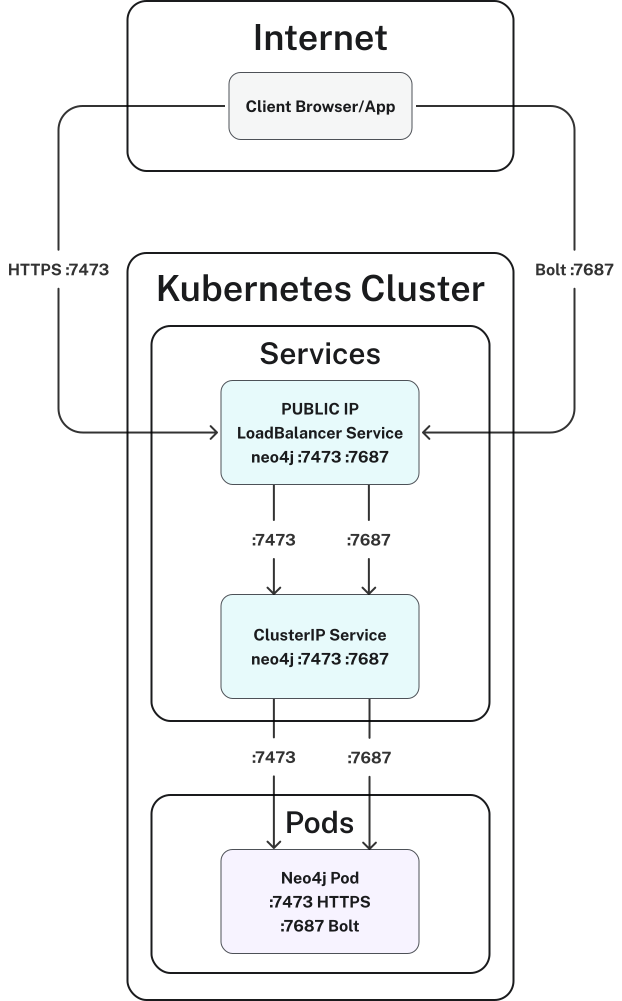
LoadBalancer connectivityBenefits:
-
You do not need to configure anything, it works out of the box.
-
All official Neo4j drivers are supported (native Bolt, no WebSocket wrapping).
Costs:
-
Neo4j is exposed directly to the Internet.
Ingress with TLS passthrough
The ingress forwards encrypted traffic as-is, without decrypting it. Neo4j handles TLS natively using its own certificates. Keep in mind that the certificates must be in place before deployment. This is a simpler alternative when you do not want to configure TCP termination at the ingress level.
For details on accessing Neo4j through Kubernetes networking, see Accessing Neo4j.
For information about configuring TLS directly in Neo4j, see Configuring SSL.
Helm values:
services:
  neo4j:
    spec:
      type: ClusterIP

config:
  dbms.connector.https.enabled: "true"
  dbms.connector.bolt.tls_level: "REQUIRED"
  dbms.ssl.policy.bolt.enabled: "true"
  dbms.ssl.policy.https.enabled: "true"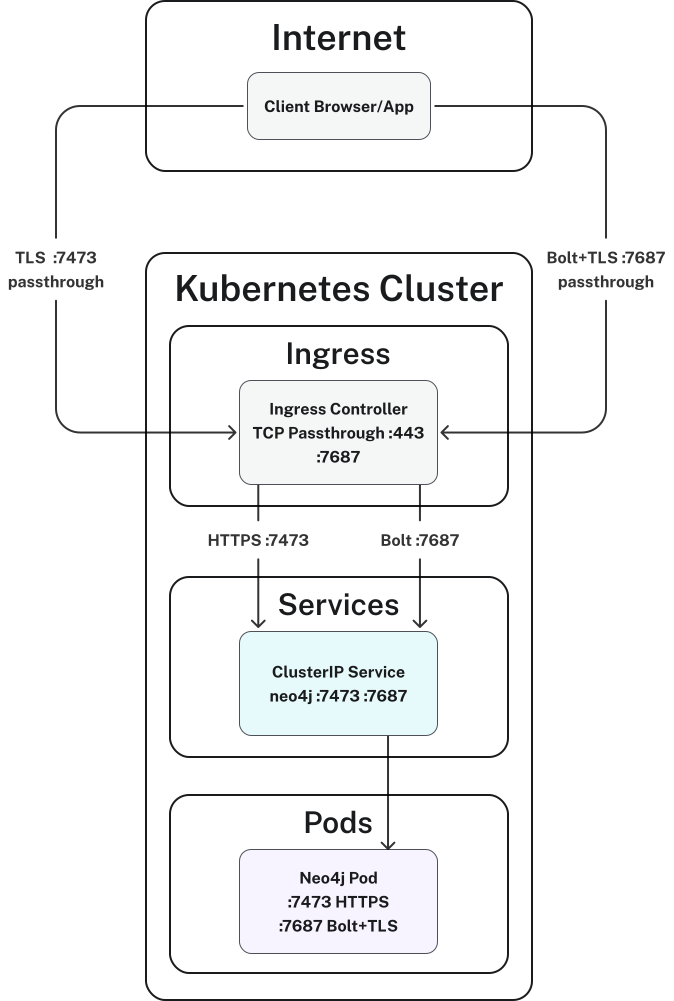
Benefits:
-
End-to-end encryption — traffic is never decrypted outside the Neo4j pod.
-
Simpler ingress configuration (no TCP termination needed).
-
Neo4j remains autonomous regarding its own TLS stack.
-
Good fit for compliance requirements that mandate end-to-end encryption.
Costs:
-
Certificate management is done directly on Neo4j.
-
Certificate rotation must be handled per instance.
-
No possibility to apply WAF or L7 policies on Bolt traffic.
Ingress with TLS termination
TLS is terminated at the ingress controller level. The Ingress decrypts traffic and forwards it in plaintext to Neo4j inside the cluster. Certificates are managed centrally via cert-manager.
For details about accessing Neo4j using Kubernetes Services, see Accessing Neo4j.
For information about the Neo4j network connectors and their TLS configuration, see Configure network connectors.
Helm values:
services:
  neo4j:
    spec:
      type: ClusterIP

# Neo4j listens in plaintext internally
config:
  dbms.connector.https.enabled: "false"
  dbms.connector.http.enabled: "true"
dbms.connector.bolt.tls_level: "DISABLED"|
Most HTTP ingress controllers handle HTTPS natively, but Bolt (TCP) requires explicit TCP routing configuration.
With Envoy Gateway or Traefik, a |
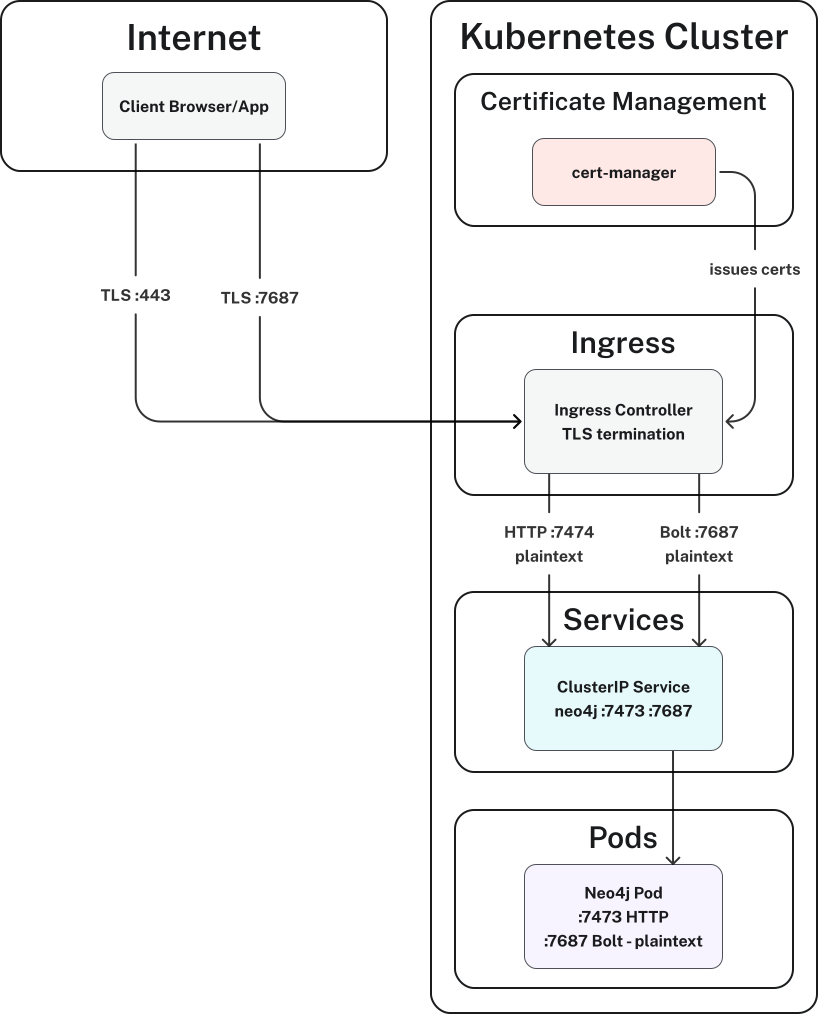
Benefits:
-
Centralized certificate management with cert-manager and automatic rotation.
-
Neo4j is not exposed directly to the Internet.
-
Single entry point for the entire cluster.
-
WAF, rate limiting, and access policies can be applied at the ingress level.
-
All Neo4j drivers are supported (native Neo4j Bolt, not limited to WebSocket).
Costs:
-
Requires explicit TCP routing configuration for Bolt (not just a standard ingress rule).
-
Traffic between Ingress and Neo4j is unencrypted, and this is acceptable only if the cluster network is trusted.
Reverse proxy-based connectivity (WSS only)
A TLS-terminating Ingress or LoadBalancer sits in front of the Neo4j reverse proxy and handles SSL/TLS termination.
It forwards plaintext HTTP/WebSocket traffic to the reverse proxy.
Bolt is exposed externally over WebSocket Secure (WSS) on the port 443 (TLS terminator), while the reverse proxy itself uses plaintext HTTP.
|
WSS is only supported by the Neo4j JavaScript driver. This covers Neo4j Browser, Bloom, and NeoDash. All other officially supported Neo4j drivers (Python, Java, Go, .NET) and ETL tools use native Bolt and do not work through a reverse proxy. If your use case includes any non-JS client, do not use this option alone — see the Ingress with TLS-terminated WSS connectivity. |
For details about accessing Neo4j through a Kubernetes Ingress and Neo4j reverse proxy, see Accessing Neo4j using Kubernetes Ingress.
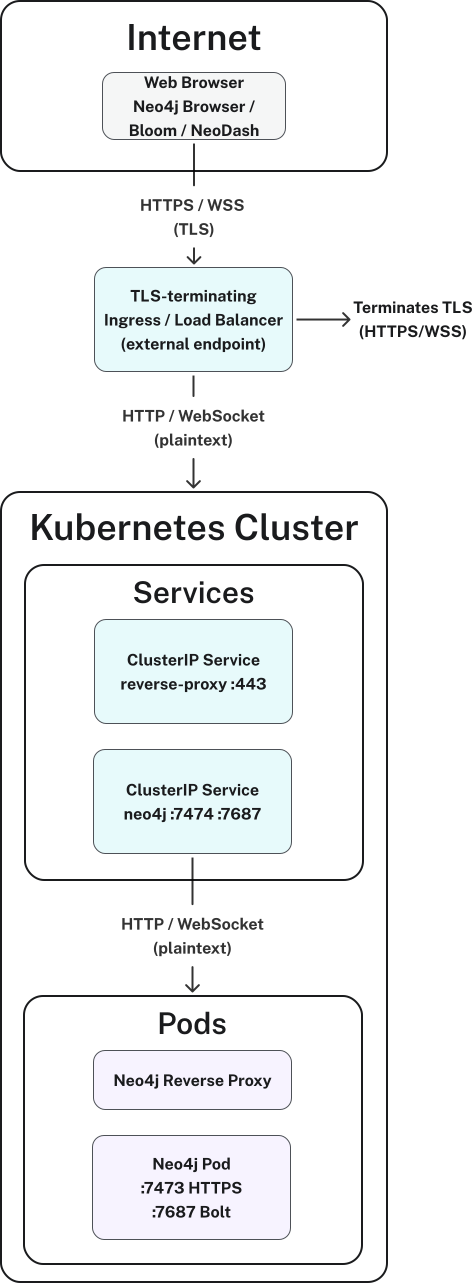
Benefits:
-
Single port (
443) for both HTTPS and Bolt. -
Good for web-only access (Neo4j Browser, Bloom, NeoDash).
Costs:
-
Only works for the JavaScript driver (WSS).
-
Other native Bolt drivers (Python, Java, Go, .NET, ETL tools) are not supported.
-
Not suitable as the sole access method if non-JS clients exist.
Ingress with TLS-terminated WSS connectivity
If you need web access via reverse proxy (WSS) and native Bolt for ETL tools or microservices, this architecture pattern combines an Ingress controller for Bolt with a reverse proxy for WebSocket traffic.
|
Neo4j reverse proxy only redirects to unsecured HTTP and Bolt.
This means you cannot enforce TLS |
For information about accessing Neo4j through a Kubernetes Ingress and reverse proxy, see Accessing Neo4j using Kubernetes Ingress.
For information about configuring Bolt and HTTP(S) connectors, see Configure network connectors.
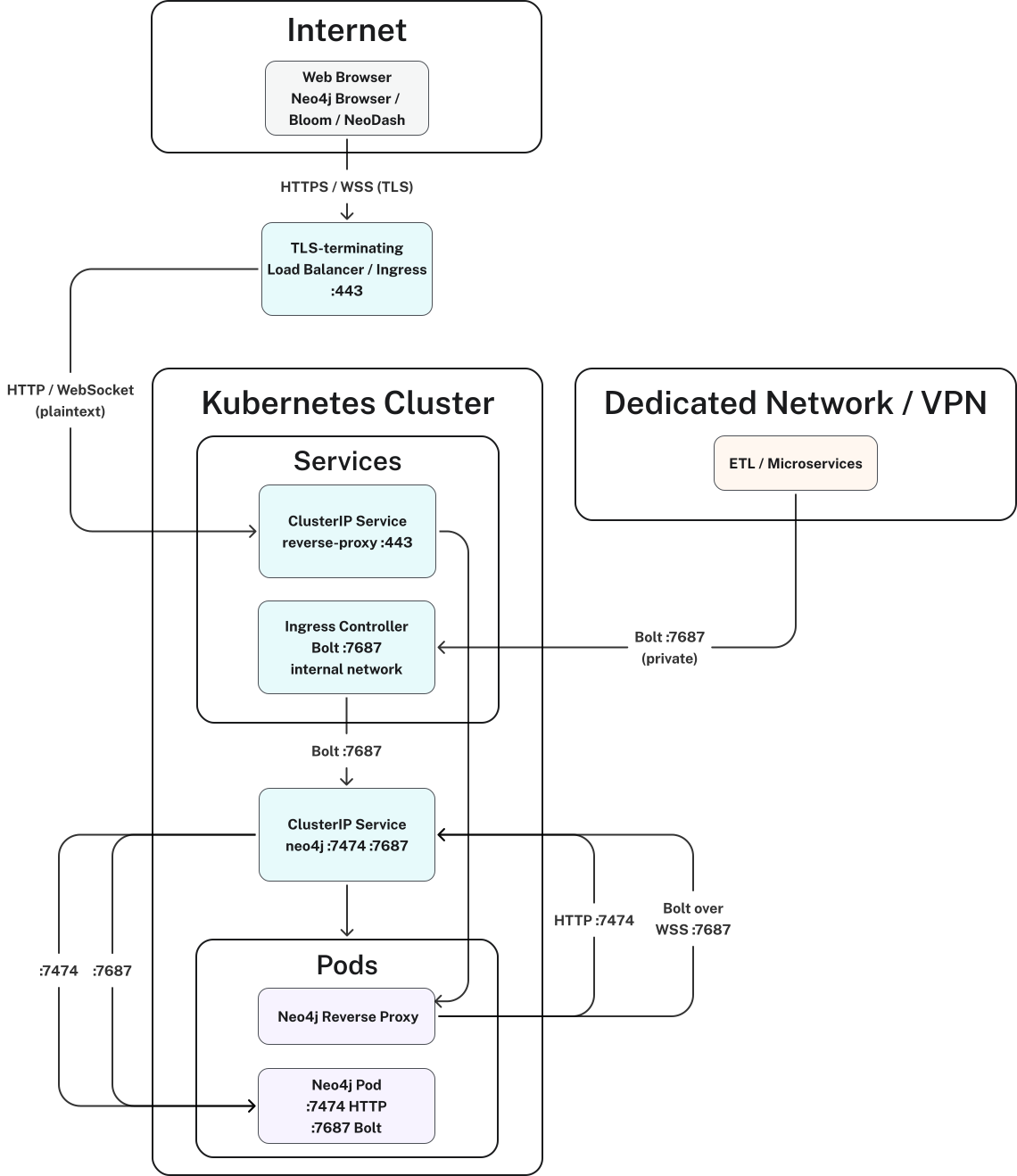
Benefits:
-
All driver types are supported (native Bolt via Ingress + WSS via Reverse Proxy).
-
Web clients (Neo4j Browser, Bloom, NeoDash) work through the reverse proxy.
-
ETL tools and microservices connect via native Bolt through the Ingress.
-
WAF and rate limiting can be applied at both Ingress and proxy levels.
Costs:
-
Higher complexity — two Ingress paths to manage.
-
Neo4j reverse proxy does not support TLS to Neo4j, so internal traffic from the proxy is unencrypted.
-
TLS
REQUIREDcannot be enforced at Neo4j level (onlyOPTIONAL).
Additional pattern: SNI-based TLS routing with Envoy
A single port 443 serves both HTTPS and Bolt, with routing based on TLS SNI (Server Name Indication).
Envoy inspects the SNI header of the TLS handshake — without decrypting the payload — and routes to the appropriate backend.
This requires DNS and valid certificates for both hostnames.
Helm values:
services:
  neo4j:
    spec:
      type: ClusterIP

config:
  dbms.connector.https.enabled: "true"
  dbms.connector.bolt.tls_level: "REQUIRED"
  dbms.ssl.policy.bolt.enabled: "true"
  dbms.ssl.policy.https.enabled: "true"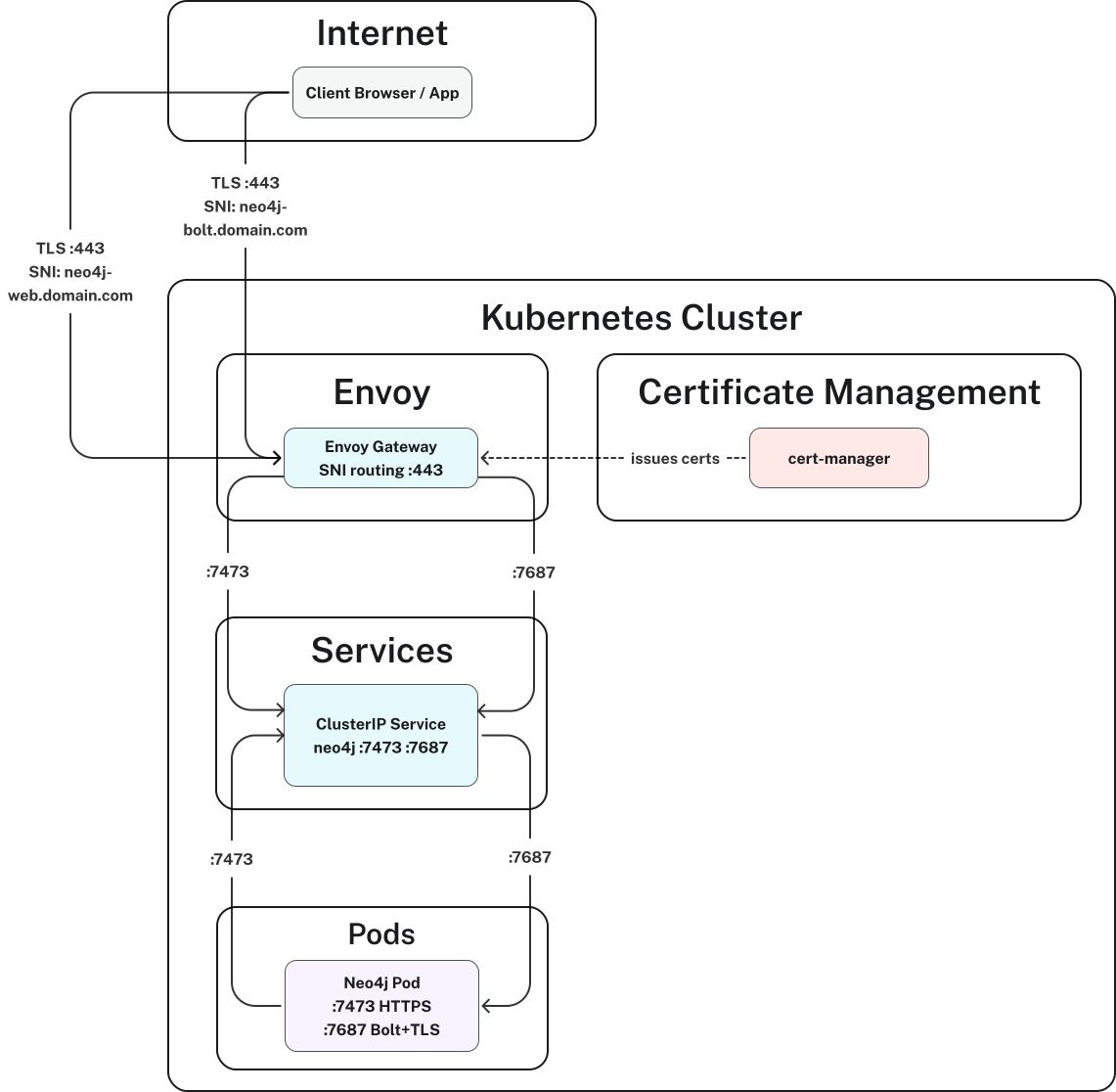
Benefits:
-
Single port
443(TCP) for all traffic. -
All Neo4j drivers are supported (native Bolt, not limited to WebSocket).
-
Fine-grained routing without decrypting payload.
-
cert-manager compatible.
-
Suitable for strict compliance environments (end-to-end encryption).
Costs:
-
Requires DNS and valid certificates configured before deployment.
-
It is more complex to set up and operate than the patterns Ingress with TLS passthrough or Ingress with TLS termination.
-
Envoy (or a SNI-capable Ingress) is required — not all ingress controllers support SNI-based TCP routing.
Client-side routing
In a Neo4j cluster, the driver can use client-side routing to discover and connect directly to individual cluster members.
For an example of client-side routing from inside Kubernetes, see Access the Neo4j cluster from inside Kubernetes.
Client-side routing requires each cluster member to be reachable at its own advertised address. Each advertised address must resolve to an externally reachable endpoint that routes traffic to the corresponding Neo4j member. The endpoints do not need to have separate external IP addresses: for example, multiple per-member DNS names can share an ingress IP and use SNI-based routing to direct each hostname to the appropriate member. A single shared endpoint that indiscriminately load-balances traffic across multiple members does not satisfy this requirement, because the driver rmust be able to reach the specific member identified by each advertised address.