Memory configuration
This page describes the different aspects of Neo4j memory configuration and use. The RAM of the Neo4j server has a number of usage areas, with some sub-areas:
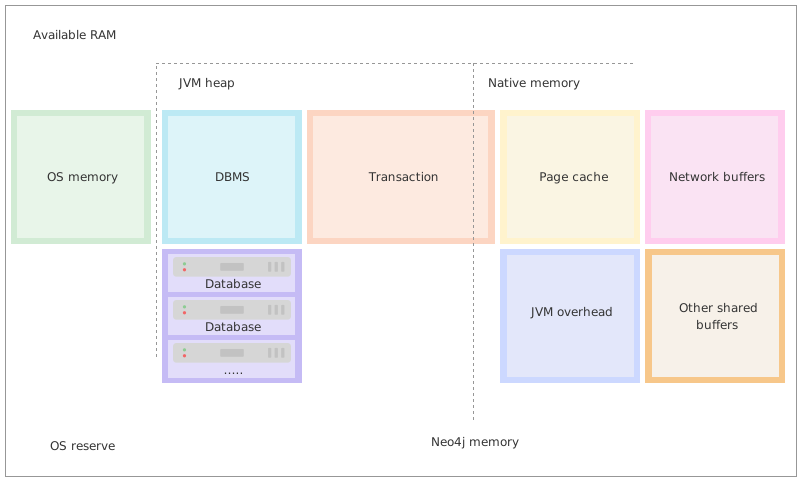
- OS memory
-
Some memory must be reserved for running the processes of the operating system itself. It is not possible to explicitly configure the amount of RAM that should be reserved for the operating system, as this is what RAM remains available after configuring Neo4j.
1GB is a good starting point for a server that is dedicated to running Neo4j. However, there are cases where the amount reserved for the OS is significantly larger than 1GB, such as servers with exceptionally large RAM.
If you have a vector index, you need to ensure that the OS has sufficient memory set aside for the vector index to perform optimally, because the vector index is loaded in OS memory and not in Neo4j page cache. For more information, see Vector index memory configuration.
If you do not leave enough space for the OS, it will start to swap memory to disk, which will heavily affect performance. Therefore, it is generally recommended to have swap turned off for a Neo4j dedicated server.
- JVM Heap
-
The JVM heap is a separate dynamic memory allocation that Neo4j uses to store instantiated Java objects. The memory for the Java objects are managed automatically by a garbage collector. Particularly important is that a garbage collector automatically handles the deletion of unused objects. For more information on how the garbage collector works and how to tune it, see Tuning of the garbage collector.
The heap memory size is determined by the parameters
server.memory.heap.initial_sizeandserver.memory.heap.max_size. It is recommended to set these two parameters to the same value to avoid unwanted full garbage collection pauses.Generally, to aid performance, you should configure a large enough heap to sustain concurrent operations.
- Native memory
-
Native memory, sometimes referred to as off-heap memory, is memory directly allocated by Neo4j from the OS. This memory will grow dynamically as needed and is not subject to the garbage collector.
- DBMS
-
The database management system, or DBMS, contains the global components of the Neo4j instance. For example, the bolt server, logging service, monitoring service, etc.
- Database
-
Each database in the system comes with an overhead. In deployments with multiple databases, this overhead needs to be accounted for.
- Transaction
-
When executing a transaction, Neo4j holds not yet committed data, the result, and intermediate states of the queries in memory. The size needed for this is very dependent on the nature of the usage of Neo4j. For example, long-running queries, or very complicated queries, are likely to require more memory. Some parts of the transactions can optionally be placed off-heap, but for the best performance, it is recommended to keep the default with everything on-heap.
This memory group can be limited with the setting
dbms.memory.transaction.total.max. - Page cache
-
The page cache is used to cache the Neo4j data stored on disk. The caching of graph data and indexes into memory helps avoid costly disk access and result in optimal performance.
The parameter for specifying how much memory Neo4j is allowed to use for the page cache is:
server.memory.pagecache.size. - Network buffers
-
Direct buffers are used by Neo4j to send and receive data. Direct byte buffers are important for improving performance because they allow native code and Java code to share data without copying it. However, they are expensive to create, which means byte buffers are usually reused once they are created.
- Other shared buffers
-
This includes unspecified shared direct buffers.
- JVM overhead
-
The JVM will require some memory to function correctly. For example, this can be:
-
Thread stacks – Each thread has its own call stack. The stack stores primitive local variables and object references along with the call stack (list of method invocations) itself. The stack is cleaned up as stack frames move out of context, so there is no GC performed here.
-
Metaspace – Metaspace stores the java class definitions and some other metadata.
-
Code cache – The JIT compiler stores the native code it generates in the code cache to improve performance by reusing it.
For more details and means of limiting the memory used by the JVM please consult your JVM documentation.
-
Considerations
- Always use explicit configuration
-
To have good control of the system behavior, it is recommended to always define the page cache and heap size parameters explicitly in neo4j.conf. Otherwise, Neo4j computes some heuristic values at startup based on the available system resources.
- Initial memory recommendation
-
Use the
neo4j-admin server memory-recommendationcommand to get an initial recommendation for how to distribute a certain amount of memory. The values may need to be adjusted to cater for each specific use case.
- Inspect the memory settings of all databases in a DBMS
-
The
neo4j-admin server memory-recommendationcommand is useful for inspecting the current distribution of data and indexes.Example 1. Useneo4j-admin server memory-recommendationto inspect the memory settings of all your databasesEstimate the total size of the database files.
bin/neo4j-admin server memory-recommendation
...
...
...
# Total size of lucene indexes in all databases: 6690m
# Total size of data and native indexes in all databases: 17050m
You can see that the Lucene indexes take up approximately 6.7GB of data, and that the data volume and native indexes combined take up approximately 17GB.
Using this information, you can do a sanity check of your memory configuration:
-
Compare the value for data volume and native indexes to the value of
server.memory.pagecache.size. -
For cases when off-heap transaction state is used, estimate transactional workload and how much memory is left to the value of
dbms.tx_state.max_off_heap_memory. -
Compare the value for Lucene indexes to how much memory is left after assigning
server.memory.pagecache.sizeandserver.memory.heap.initial_size.
In some production systems the access to memory is limited and must be negotiated between different areas. Therefore, it is recommended to perform a certain amount of testing and tuning of these settings to figure out the optimal division of the available memory. -
- Limit transaction memory usage recommendation
-
The measured heap usage of all transactions is only an estimate and the actual heap utilization may be slightly larger or slightly smaller than the estimated value. In some cases, limitations of the estimation algorithm to detect shared objects at a deeper level of the memory graph could lead to overestimations. This is because a conservative estimate is given based on aggregated estimations of memory usage, where the identities of all contributing objects are not known, and cannot be assumed to be shared. For example, when you use
UNWINDon a very large list, or expand a variable length or shortest path pattern, where many relationships are shared between the computed result paths.In these cases, if you experience problems with a query that gets terminated, you can execute the same query with the transaction memory limit disabled. If the actual heap usage is not too large, it might succeed without triggering an out-of-memory error.
Capacity planning
In many use cases, it is advantageous to try to cache as much of the data and indexes as possible. The following examples illustrate methods for estimating the page cache size, depending on whether you are already running in production or planning for a future deployment:
First, estimate the total size of data and indexes, and then multiply with some factor, for example 20%, to allow for growth.
bin/neo4j-admin server memory-recommendation
...
...
...
# Total size of lucene indexes in all databases: 6690m
# Total size of data and native indexes in all databases: 35050m
You can see that the data volume and native indexes combined take up approximately 35GB. In your specific use case, you estimate that 20% will provide sufficient head room for growth.
server.memory.pagecache.size = 1.2 * (35GB) = 42GB
You configure the page cache by adding the following to neo4j.conf:
server.memory.pagecache.size=42GBWhen planning for a future database, it is useful to run an import with a fraction of the data, and then multiply the resulting store size delta by that fraction plus some percentage for growth.
-
Run the
memory-recommendationcommand to see the total size of the data and indexes in all current databases.bin/neo4j-admin server memory-recommendation ... ... ... # Total size of lucene indexes in all databases: 6690m # Total size of data and native indexes in all databases: 35050m -
Import 1/100th of the data and again measure the data volume and native indexes of all databases.
bin/neo4j-admin server memory-recommendation
...
...
...
# Total size of lucene indexes in all databases: 6690m
# Total size of data and native indexes in all databases: 35400m
You can see that the data volume and native indexes combined take up approximately 35.4GB.
-
Multiply the resulting store size delta by that fraction.
35.4GB - 35GB = 0.4GB * 100 = 40GB
-
Multiply that number by 1.2 to size up the result, and allow for 20% growth.
server.memory.pagecache.size= 1.2 * (40GB) = 48GB -
Configure the page cache by adding the following to neo4j.conf:
server.memory.pagecache.size=48G
Limit transaction memory usage
By using the dbms.memory.transaction.total.max setting you can configure a global maximum memory usage for all of the transactions running on the server.
This setting must be configured low enough so that you do not run out of memory.
If you are experiencing OutOfMemory messages during high transaction load, try to lower this limit.
Neo4j also offers the following settings to provide fairness, which can help improve stability in multi-tenant deployments.
-
The setting
db.memory.transaction.total.maxlimits the transaction memory usage per database. -
The setting
db.memory.transaction.maxconstrains each transaction.
When any of the limits are reached, the transaction is terminated without affecting the overall health of the database.
To help configure these settings you can use the following commands to list the current usage:
CALL dbms.listPools()
SHOW TRANSACTIONS
Or alternatively, you can monitor the memory usage of each query in the query.log.