Salesforce Agentforce — Neo4j MCP Integration
| Documentation for a Neo4j Labs project, which is governed by these terms. |
Overview
Salesforce Agentforce includes a native MCP client. A third-party remote MCP server is registered in Agentforce Registry, Salesforce discovers its tools, and an administrator chooses which tools to allow. Each selected tool becomes an action in the Agentforce Asset Library that can be added to a subagent. This removes the adapter code that would otherwise live in Apex, Flow, or a custom REST integration: the MCP server publishes tool descriptions and input schemas, and Agentforce decides when an available tool is relevant.
This guide is the complete walkthrough of Track A: Native MCP Client from the main integration guide. It connects Agentforce to the Neo4j company-news demo graph used by the Get company insights use case: registration, authentication options, agent configuration in Agent Script, live testing, troubleshooting, and Agentforce Gateway policies.
There are important boundaries. At the time of writing, Agentforce supports Streamable HTTP MCP servers and server tools. MCP prompts, resources, and other protocol capabilities are not supported end to end. Agentforce Builder also works best with primitive values and shallow JSON response structures; deeply nested or dynamic payloads complicate variable mapping and action chaining. Salesforce’s MCP for Agentforce overview and current MCP considerations document the supported surface and its limits.
Those constraints affect tool design. A narrow operation such as get_company_insights is easier to govern and consume than a generic database tool. For this walkthrough, however, we intentionally use Neo4j’s read-only read-cypher tool. It validates schema discovery, action generation, Cypher inputs, and graph-grounded answers without exposing write operations.
Integration approach
-
Expose a Streamable HTTP MCP server that Salesforce can authenticate to (or, for the demo, an unauthenticated bridge).
-
Register the server in Agentforce Registry and allowlist tools.
-
Confirm the generated MCP actions in the Agentforce Asset Library.
-
Attach the action to a dedicated subagent in Agentforce Studio.
-
Give the subagent focused reasoning instructions.
-
Verify with Live Test and trace inspection.
-
Apply Agentforce Gateway policies for quotas and tool-level access control.
Target architecture
Agentforce
    → Salesforce MCP client
        → Remote MCP server
            → Neo4j graph tools
                → Neo4j database
For the demo, the "remote MCP server" hop is split in two by an authentication bridge (see A small authentication bridge for the demo):
Agentforce
    → Salesforce MCP client
        → unauthenticated demo bridge
            → Basic-authenticated Neo4j demo MCP server
                → company-news knowledge graph
Prerequisites
-
Salesforce org with Agentforce enabled. Starting in July 2026, Salesforce creates new agents in Agentforce Studio with Agent Script rather than the legacy builder; existing legacy agents can be upgraded. Salesforce’s July 2026 builder release note explains the transition.
-
A reachable Streamable HTTP MCP endpoint backed by Neo4j — the demo bridge described below, or a self-hosted official Neo4j MCP server.
-
The company-news demo graph (
neo4j+s://demo.neo4jlabs.com:7687, databasecompanies, credentialscompanies/companies) from the main guide.
Authentication
Authorization is where the current Salesforce and hosted Aura Agent MCP implementations diverge.
Salesforce MCP registrations support two primary authentication modes:
-
No authentication.
-
OAuth 2.0 using the
client_credentialsgrant.
Salesforce does not currently support interactive authorization-code or PKCE flows for these registrations, and it does not pass an individual Agentforce user’s identity to the MCP server. The identity in a client_credentials exchange represents the Salesforce integration itself.
A typical machine-to-machine exchange looks like this:
-
The MCP provider provisions a confidential OAuth client for Salesforce.
-
Salesforce sends the client ID and secret to the authorization server’s token endpoint.
-
The request uses
grant_type=client_credentials, with any required audience or scopes. -
The authorization server returns a bearer access token.
-
Salesforce presents the token when it calls the MCP server.
-
The MCP server validates the token and permits access to the selected tools.
This model fits server-to-server integrations: credentials are centrally managed, no browser login is required, and access can be scoped to the integration.
The hosted Aura Agent MCP mismatch
The hosted MCP endpoint for an Aura Agent currently uses a different model. Its setup flow asks the MCP client to open an interactive authorization window and sign in with an Aura Console user. That works for interactive clients such as Claude Desktop, but Agentforce cannot complete the browser redirect when registering an external MCP server.
It is worth distinguishing the two public Aura Agent surfaces. The Aura Agent REST API supports bearer tokens obtained with Aura API client credentials, while the Aura Agent MCP connection currently documents an interactive Aura login. The fact that machine credentials exist for the REST API does not make them interchangeable with the hosted MCP endpoint. Aura Agent’s external access documentation describes both flows.
This is an identity-model mismatch, not a limitation of graph-backed MCP tools:
Salesforce MCP registration              Aura Agent hosted MCP
-----------------------------------      ------------------------------
Application identity                     Aura user identity
Client ID and secret                     Interactive Aura login
No browser interaction                   Browser redirect and consent
client_credentials                       authorization_code-style flow
A small authentication bridge for the demo
To validate the Agentforce MCP path against the existing Neo4j company-news demo, we introduced a small bridge between Salesforce and the remote Neo4j demo server.
The bridge is intentionally narrow. It does not implement new graph tools or reproduce the Neo4j MCP server. It exposes a Salesforce-compatible Streamable HTTP endpoint and forwards MCP requests to:
https://mcp.demo.neo4jlabs.com/mcpThe upstream demo server uses HTTP Basic authentication with the public demo credentials companies:companies. The bridge adds that fixed authorization header when forwarding each request upstream:
Authorization: Basic Y29tcGFuaWVzOmNvbXBhbmllcw==Salesforce registers the bridge using its No Authentication option. The bridge preserves the MCP contract for initialization, tool discovery, and tool execution. Its only job is to bridge the authentication mismatch long enough to prove that Salesforce can discover Neo4j tools, allowlist them, turn them into agent actions, and invoke them end to end.
|
Warning: This is a demo technique, not a production security architecture. The inbound endpoint is unauthenticated and the upstream credential is fixed. Use it only with disposable infrastructure, public demo data, read-only tools, and credentials that have no value outside the demonstration. A production bridge must authenticate inbound callers, protect secrets, restrict network access, validate requests, and be observable. |
Register the Neo4j MCP tools in Salesforce
With the bridge (or a self-hosted server) running, register its Streamable HTTP URL as a third-party MCP server in Agentforce Registry. Salesforce connects to the endpoint, discovers its tools, and asks which ones should be available in the Asset Library.
The demo server exposes three tools:
-
list-gds-procedures -
get-schema -
read-cypher
For the first end-to-end test, select only read-cypher. A smaller toolset reduces ambiguity while you validate routing and execution. Add get-schema later if the subagent genuinely needs to inspect an unfamiliar graph, and add GDS discovery only for graph data science use cases.
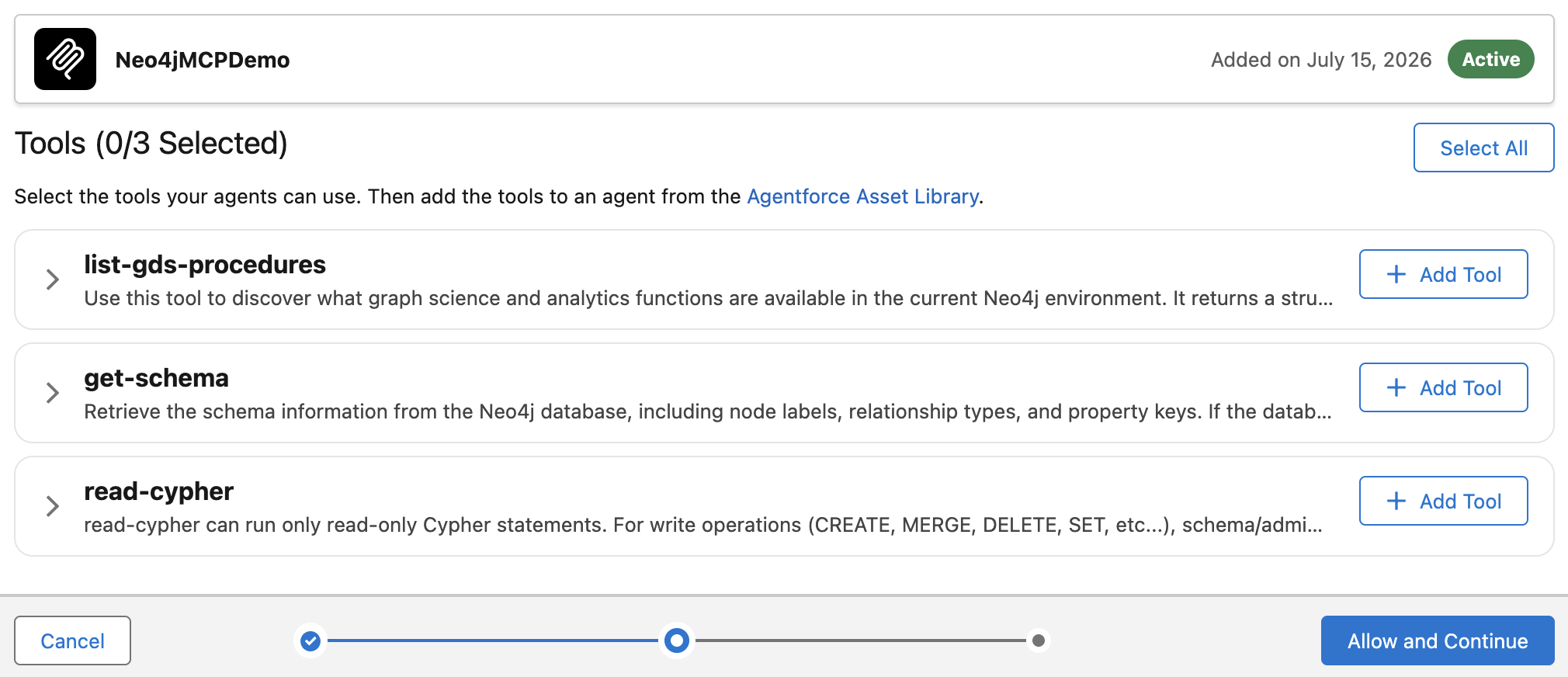
Allowlisting a tool creates an action; it does not attach that action to an agent. Confirm the generated action under:
Setup
→ Agentforce
→ Agentforce Assets
→ Actions
MCP actions follow the naming pattern:
<Tool Name> <Server Name>For the server shown above, the generated action is similar to read-cypher - Neo4jMCPDemo and carries the MCP action icon.
Create a focused subagent
For this demo, either create a new agent in Agentforce Studio or upgrade the company-intelligence agent from the main guide. Make sure the version you open is a draft; committed versions must be copied to a new draft before editing.
Create a dedicated subagent named Company Intelligence. Its routing description should make the boundary explicit:
|
Answers questions about companies and their connected business context using a Neo4j knowledge graph. Use this subagent for company profiles, competitors, suppliers, subsidiaries, executives, industries, locations, and related news. |
The root router remains instruction-light. Its job is to recognize a company-intelligence request and transition to this subagent. The focused subagent owns the Neo4j action and the rules for using graph results.
Attach the generated MCP action
In the Explorer panel:
-
Open the
Company Intelligencesubagent. -
Add an action from the Agentforce Asset Library.
-
Select the generated
read-cypherMCP action. -
Save the agent.
Salesforce copies the action into that agent version. In Script view, verify that it appears in two places:
-
The subagent-level
actions:block defines the executable action. -
The
reasoning.actions:block makes it available as a tool the reasoning engine can select.
Subagents do not share actions. Attaching read-cypher to the root, another subagent, or only the Asset Library does not make it available to Company Intelligence. Salesforce’s MCP action guide documents the Asset Library flow. The Agent Script example shows their shape, but its generated values are not portable.
Reasoning instructions
Native discovery tells Agentforce how to call a tool, but it does not tell the subagent how the company graph should be used. Add focused instructions for graph semantics, read-only query safety, result size, grounding, and presentation:
Use the Read Cypher action to retrieve facts from the Neo4j company knowledge graph.

The graph contains Organization nodes representing companies. Organization relationships include HAS_COMPETITOR, HAS_SUPPLIER, HAS_SUBSIDIARY, HAS_CEO, HAS_BOARD_MEMBER, HAS_INVESTOR, HAS_CATEGORY, and incoming MENTIONS relationships from Article nodes.

Match company names case-insensitively. Generate only read-only Cypher queries. Never generate CREATE, MERGE, DELETE, SET, REMOVE, DROP, or other modifying operations.

Limit returned collections to at most 10 results unless the user explicitly requests otherwise. Prefer parameterized queries where practical.

Use the graph results as factual grounding. Never invent companies, relationships, people, or articles that aren't present in the action result. If no matching organization is found, explain this and ask the user for a more precise company name.

Summarize the graph results for a business user. Clearly distinguish facts returned from Neo4j from your interpretation of why those facts might matter.
This preserves the design principle from the main guide: keep the overall agent instruction-light while placing domain-specific guidance at the narrowest useful boundary. The router handles intent. The subagent handles graph behavior. The MCP action handles execution. Neo4j returns the facts.
Instructions are not a security boundary. They improve tool selection and response quality, but the actual controls remain the read-only action, the database identity, tool allowlisting, authentication, and gateway policies.
Validation
Use Live Test for the end-to-end check. Simulation mode is useful for routing and conversational logic, but it mocks action execution. It cannot prove that Salesforce reached the remote MCP server or that Neo4j returned a usable result. Salesforce’s preview documentation explains the difference between simulated and live actions.
Start with a small prompt:
|
Using the Neo4j knowledge graph, list up to five competitors of Neo4j. |
Then try the complete briefing:
|
Give me a business briefing on Neo4j. Include its company profile, up to five competitors, up to five suppliers, subsidiaries, leadership, and recent related news. Use the Neo4j knowledge graph. |
In the trace, look for this sequence:
Input
→ Transition to Subagent: Company Intelligence
→ Available Actions: read-cypher ...
→ Action Invocation
→ Action Result
→ Final Response
Governance with Agentforce Gateway policies
Registration and allowlisting answer the first question — which server tools can become Salesforce actions — but production teams also need to control usage by agent and over time. Agentforce Gateway provides two policy types that are especially relevant to Neo4j MCP connections.
MCP quota management
Quota policies limit how many outbound calls agents can make to an MCP server during a configured interval. Quotas can be shared or applied per tool and per agent, depending on how the policy is targeted. This protects more than infrastructure capacity: an agent can retry after ambiguous results, call the same tool several times while reasoning, or enter an accidental loop. A quota limits the operational and cost impact of that behavior and gives teams a concrete threshold to monitor.
MCP attribute-based access control
MCP attribute-based access control policies allow or block access to tools by tool name and can be targeted to selected agents. For example, a research agent may be allowed to use read-cypher, while administrative or write-capable tools remain unavailable even if the same registered server exposes them. This creates a second control layer after allowlisting and is particularly useful when multiple agents share a server but should not share the same tool privileges.
Agentforce Gateway policy templates describe quota and MCP access-control options, while the policy application guide covers manual and rule-based targeting.
Gateway policies complement rather than replace server-side security. Keep Neo4j permissions least-privileged, keep write tools out of read-only agents, validate inputs, cap result sizes, and retain server-side logs. A denied tool call is safer than an instruction asking the model not to make one.
Summary
The native MCP path is now a practical integration track: Salesforce discovers Neo4j MCP tools without a custom OpenAPI specification, selected tools become governed Agentforce actions through the Asset Library, Agent Script makes the relationship between subagent actions and reasoning tools inspectable, and live traces show routing, tool availability, invocation, and results end to end.
What MCP does not standardize is identity. Salesforce speaks machine-to-machine client_credentials; the hosted Aura Agent MCP endpoint currently expects an interactive Aura login. For the demo, a deliberately limited bridge validates the data path. For production, use a self-hosted Neo4j MCP server behind a client-credentials-compatible identity layer, least-privileged graph access, and gateway policies that constrain tool use.