IBM watsonx Orchestrate + Neo4j Integration
| Documentation for a Neo4j Labs project, which is governed by these terms. |
Build watsonx Orchestrate agents that use a Neo4j knowledge graph as their knowledge layer, through the Model Context Protocol (MCP).
This integration contains two agents:
-
`neo4j_explorer` — a native Orchestrate agent that inspects the graph schema, generates Cypher, and answers questions about companies, people, and investments. Graph access comes from the official Neo4j MCP server (
neo4j-mcp-server), registered as a local (stdio) toolkit that Orchestrate installs and runs inside its own runtime, plus one curated Python tool. -
`memory_agent` — a LangGraph agent imported into Orchestrate that adds long-term, cross-session memory through the Neo4j Agent Memory Service (NAMS), and queries the companies graph when a question needs it.
Both agents are set up entirely from the command line.
Background
IBM watsonx Orchestrate is IBM’s platform for building and running AI agents. Unlike a code-first framework where the agent lives in your own process, an Orchestrate agent lives on the platform: you describe it declaratively — a model, a style, instructions, and a toolset — and Orchestrate runs it, gives it a chat surface, and manages its lifecycle across draft and live environments. Orchestrate can also run code-based agents: LangGraph agents can be imported into its runtime, which is how the memory agent here is built.
Neo4j is a graph database. Instead of rows and joins, it stores entities as nodes and relationships as first-class connections between them, which makes multi-hop questions — "which people sit on the boards of two different companies," "what connects these two organizations" — cheap to express and fast to answer. That property is exactly what makes a graph a strong knowledge layer for an agent: the hard questions for a normal database are the natural ones for a graph.
The Model Context Protocol (MCP) is the open standard that connects the two. An MCP server exposes a set of tools over a common interface; an MCP client — here, watsonx Orchestrate — discovers those tools and lets the agent call them. Neo4j publishes an official MCP server, neo4j-mcp-server, that exposes graph operations as tools: get-schema, read-cypher, write-cypher, and list-gds-procedures. Because the contract is standardized, the same server that works in Claude Desktop or VS Code works in Orchestrate with no changes.
How the pieces fit. Orchestrate can consume an MCP server in two ways: a remote server reached over HTTPS that you host yourself, or a local (stdio) server that Orchestrate installs and runs inside its own runtime. This integration uses the local option, because it removes hosting entirely — no container, no deployment, no public endpoint, no inbound authentication layer. Orchestrate installs neo4j-mcp-server, runs it as a subprocess, and passes the Neo4j credentials into that process as environment variables. The server then connects outbound to Neo4j over Bolt. Note that Orchestrate’s own built-in knowledge feature is vector-based RAG (backed by stores such as Milvus or Elasticsearch); there is no native graph retriever, so graph access is provided through MCP tools rather than a knowledge base.
Architecture
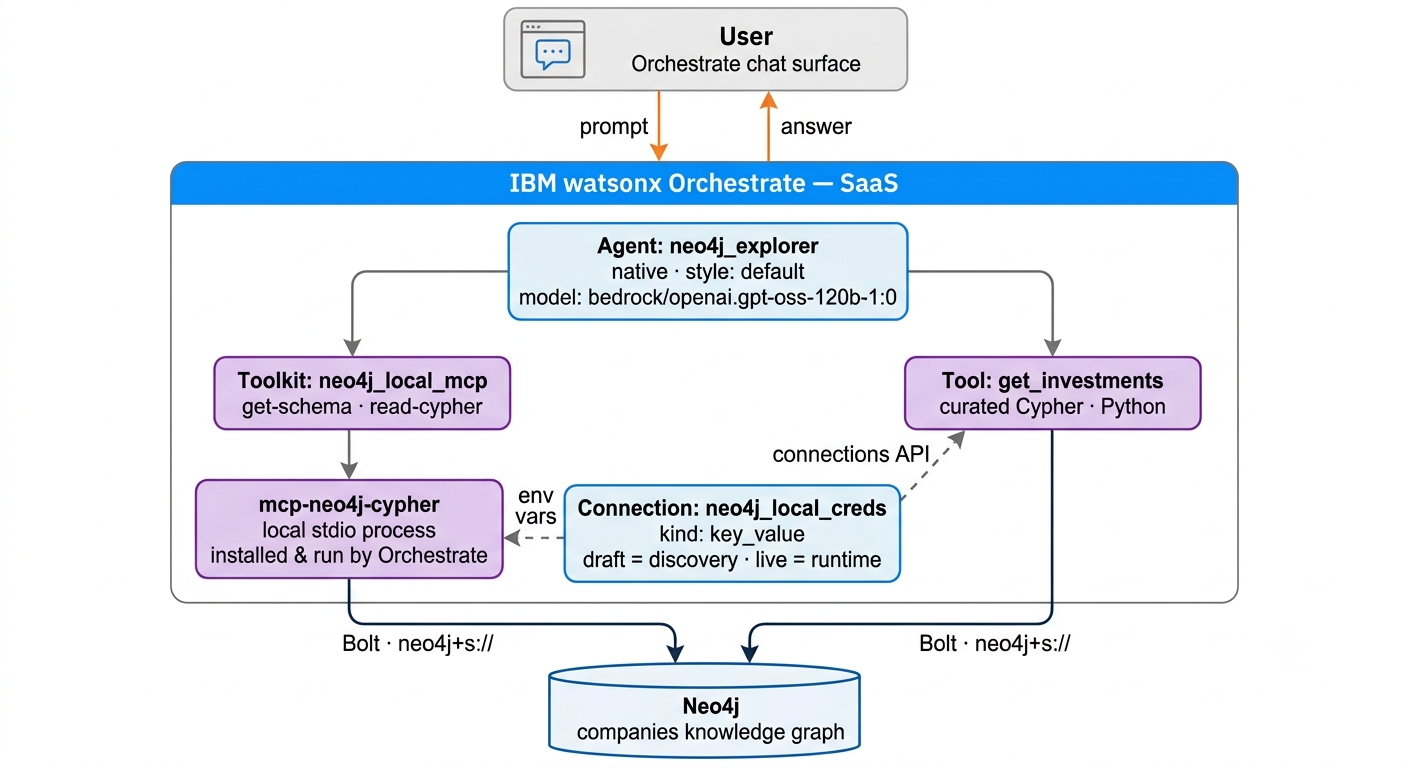
The runtime execution flow functions along the following boundaries:
Agent Runtime. The user prompt is received by the Orchestrate-hosted chat surface and passed to the native agent neo4j_explorer (model bedrock/openai.gpt-oss-120b-1:0). The agent’s instructions govern tool selection, schema-first querying, and result limits.
Tool Resolution. The agent’s toolset resolves to the MCP tools of the neo4j_local_mcp toolkit and the Python tool get_investments. Orchestrate performs tool discovery and schema validation at import time using the draft credentials, and executes tools at runtime using the live credentials.
MCP Execution. Orchestrate installs the neo4j-mcp-server package and runs it as a local stdio process within its own runtime. The neo4j_local_creds connection is injected into that process as environment variables (NEO4J_MCP_URI, NEO4J_MCP_USERNAME, NEO4J_MCP_PASSWORD, NEO4J_MCP_DATABASE, NEO4J_MCP_READ_ONLY, NEO4J_MCP_TELEMETRY). No inbound network exposure or HTTP authentication layer is involved.
Graph Execution. The MCP server connects outbound to Neo4j over Bolt (neo4j+s://) and executes get-schema, read-cypher, or list-gds-procedures against the companies knowledge graph, returning structured results to the agent for synthesis. NEO4J_MCP_READ_ONLY=true disables write-cypher at the server level, so it is not exposed to the agent.
The connection is the only place credentials live. It carries two sets of keys: NEO4J_MCP for the MCP server, and NEO4J for the get_investments Python tool, which reads them through the connections API.
Prerequisites
-
watsonx Orchestrate instance (the free trial is sufficient)
-
Python 3.11+, macOS or Linux (use WSL2 on Windows)
-
Network access to a Neo4j instance
The defaults target the public Neo4j companies demo database, so no database setup is required. Point the NEO4J_* values in .env at an Aura or self-managed instance to use your own graph — nothing else in the setup changes.
Quickstart
cd ibm-watsonx
python3.11 -m venv venv && source venv/bin/activate
pip install -U ibm-watsonx-orchestrate

cp .env.example .env      # then fill in WO_ENV_NAME and WO_INSTANCE_URL
make all
make all registers the environment, creates the connection, adds the MCP toolkit, imports the Python tool, and imports the agent. It will prompt once for your API key. When it finishes, open Agent Builder in the Orchestrate console and chat with neo4j_explorer.
Prefer building the agent in the UI? The walkthrough in docs/console-agent-setup.md creates the same agent from the same connection, toolkit, and tool.
Getting your credentials
In the Orchestrate console, click your profile icon and go to Settings → API details. Copy the service instance URL into WO_INSTANCE_URL.
To create the API key, click Generate API key. On AWS-hosted instances this opens Access management in the IBM SaaS console, where the key is created; copy it when it is shown, as it cannot be retrieved later. Use this key, not an IBM Cloud IAM key — an IAM key produces a misleading Scope not found error.
API sessions expire. If a command fails with an authentication error, run orchestrate env activate <env-name> again.
What each step does
| Target | Command | Effect |
|---|---|---|
|
|
Registers and activates the instance |
|
|
Creates |
|
|
Installs and registers |
|
|
Imports |
|
|
Imports |
|
— |
Lists toolkits, tools, models, and agents |
Individual scripts live in scripts/ if you would rather run the commands one at a time.
Referencing MCP tools in the agent
The agent lists each MCP tool individually under tools:, using the <toolkit>:<tool> name shown by orchestrate tools list:
tools:
  - get_investments
  - neo4j_local_mcp:get-schema
  - neo4j_local_mcp:read-cypher
  - neo4j_local_mcp:list-gds-procedures
Referencing the whole toolkit with a toolkits: key instead fails on CLI import with "Toolkits are only supported for experimental_customer_care style agents". See docs/known-issues.md.
Trying it
In the Agent Builder preview chat for neo4j_explorer:
| Prompt | Expected tool |
|---|---|
What is in this graph? |
|
List 5 companies in the semiconductor industry |
|
Who invested in Databricks? |
|
Are there board members shared between two companies? |
|
A multi-hop question is trivial Cypher and awkward for most other retrieval strategies, which is the clearest argument for a graph as an agent’s knowledge layer. Expand the tool-call trace on each answer to see which tool the agent selected.
Notes on the custom tool
get_investments is deliberately minimal — one query, one clear docstring. Three things about it are worth copying into your own tools:
Credentials come from the connection. The @tool decorator declares expected_credentials with type key_value_creds, and the tool reads the values with connections.key_value(…). Note the spelling differs from the CLI, where the connection kind is key_value.
Dependencies are installed server-side and must be pinned exactly. neo4j==5.28.1, never neo4j>=5. Packages are also checked against a tenant-specific allowlist at import time. The first call after import may return "We are configuring your tool in the background" — that is the install running; wait a few minutes and retry.
The docstring is the routing signal. Orchestrate derives the tool description and argument descriptions from a Google-style docstring, and the model chooses tools from those descriptions. A vague docstring means the agent falls back to read-cypher and your curated query never runs.
Memory + graph agent (cross-session, LangGraph)
The memory-agent/ folder contains a second, independent agent that adds two capabilities a native YAML agent cannot: long-term memory and LLM-routed graph queries, in one code-based agent. It is a LangGraph agent imported into Orchestrate (running inside the platform runtime) that uses Neo4j as both layers — the Neo4j Agent Memory Service (NAMS) for what it remembers, and the companies graph for what it knows.
How it works
The agent runs a single graph node that performs three steps per turn:
recall   → search the NAMS entity graph for facts relevant to the question
respond  → LLM answers, calling graph tools in an internal loop if needed
persist  → send the user's message to NAMS for background entity extraction
Memory is recalled every turn and injected into the prompt. The companies graph is queried only when the LLM decides it is needed: the graph is exposed as two tools (get_graph_schema, run_graph_query) bound to the model, and they run only when the model emits a tool call. A question answerable from memory alone runs no graph query; a company question does; a question needing both pulls the preference from memory and filters the graph query accordingly.
The tool-calling loop runs inside the node, and the node returns exactly one plain assistant message to Orchestrate. Imported LangGraph agents run behind an A2A protocol layer, and returning internal tool-call and tool-result messages causes that layer to fail with argument of type 'NoneType' is not iterable after the agent has completed.
Memory lives in NAMS rather than the agent’s own state, which matters because imported LangGraph agents only persist messages between turns, not custom state. Because memory is external and workspace-scoped, it carries across separate chat sessions.
Setup
Three connections supply credentials. Orchestrate injects them into the agent as {app_id}_{credential_type}. The companies graph uses the public Neo4j demo database and needs no connection.
| Connection | Injected key | Value |
|---|---|---|
|
|
NAMS API key (memory.neo4jlabs.com/dashboard) |
|
|
NAMS workspace id ( |
|
|
OpenAI API key for the agent’s LLM |
cd memory-agent
export NAMS_API_KEY=...
export NAMS_WORKSPACE_ID=...
export OPENAI_API_KEY=...
./setup.sh
setup.sh creates the connections, imports the agent with orchestrate agents import --package-root ., and attaches the connections with orchestrate agents connect -n memory_agent -a <app-id>.
Demonstrating it
Memory works across sessions, so use two separate chats:
-
Session A — state a fact: "Remember that John is only interested in cyber security companies." The agent acknowledges it.
-
Wait. NAMS extracts entities asynchronously — a few seconds to a few minutes. You can watch entities appear in the NAMS dashboard.
-
Session B (new chat) — ask: "Which companies should John look at?" The agent recalls John’s cyber security interest and queries the companies graph accordingly — memory and graph together.
A note on consistency
Writes are acknowledged immediately, but entity extraction runs in the background, so memory is eventually consistent — a fact is not always retrievable in the same turn it was stated. This is a characteristic of the NAMS extraction pipeline, not of watsonx Orchestrate or the agent. The cross-session demo is unaffected, since time passes between sessions.
Layout
.
├── Makefile                      one target per setup step
├── .env.example                  configuration template
├── agents/
│   └── neo4j_explorer.yaml       agent definition (imported by `make agent`)
├── tools/
│   ├── get_investments.py        curated Python tool
│   └── requirements.txt          exact-pinned dependencies
├── scripts/                      01_env … 05_agent
├── memory-agent/                 LangGraph memory + graph agent
│   ├── agent.py                  recall → respond (+ graph tools) → persist
│   ├── agent.yaml                agent package definition
│   ├── requirements.txt
│   └── setup.sh                  connections + import + connect
└── docs/
    ├── console-agent-setup.md    optional: build the agent in the UI
    ├── known-issues.md           errors and their causes
    └── images/                   console screenshots
Verified against
watsonx Orchestrate trial (AWS) · ADK 2.17.0 · Python 3.11 · neo4j-mcp-server 1.6.0 (local stdio) · Neo4j companies demo database · bedrock/openai.gpt-oss-120b-1:0
Resources
watsonx Orchestrate
-
ADK developer docs: https://developer.watson-orchestrate.ibm.com
-
ADK repository: https://github.com/IBM/ibm-watsonx-orchestrate-adk
Neo4j
-
Neo4j MCP server (
neo4j-mcp-server): https://pypi.org/project/neo4j-mcp-server/ -
Neo4j MCP documentation: https://neo4j.com/docs/mcp/current/
-
Neo4j Agent Memory: https://neo4j.com/labs/agent-memory/
Model Context Protocol
-
Specification: https://modelcontextprotocol.io