Snowflake Cortex - Aura MCP
| Documentation for a Neo4j Labs project, which is governed by these terms. |
This guide connects a Cortex agent to the MCP server that Neo4j Aura runs for every instance. The agent uses the server’s tools to read the graph schema and run its own Cypher. Unlike the Terraform sample and the Snowsight sample, it needs no UDFs, secrets or network rules.
You can also watch this guide step by step on YouTube.
What you build
| Step | Object | What it is |
|---|---|---|
MCP URL |
The address of the MCP server of your Aura instance. |
|
|
Holds the MCP server object and the agent. |
|
|
Lets Snowflake call the Aura MCP server and sign users in with OAuth. |
|
|
The MCP server object that agents use. |
|
|
The Cortex agent with the MCP server attached. |
Before you start
-
You need a Snowflake account with the
ACCOUNTADMINrole and a warehouse. X-Small is enough. -
You need a running Aura instance. A free instance is enough. This guide uses the Movies sample dataset, which you can pick when you create the instance.
-
MCP connectors support only OAuth. Every user who chats with the agent signs in with their own Aura account, so each user needs access to the Aura project.
-
Create a workspace SQL file for the SQL statements: Projects > Workspaces > + Add new > SQL file. Select your warehouse in it.
1. MCP URL
-
Open the Aura console at console.neo4j.io.
-
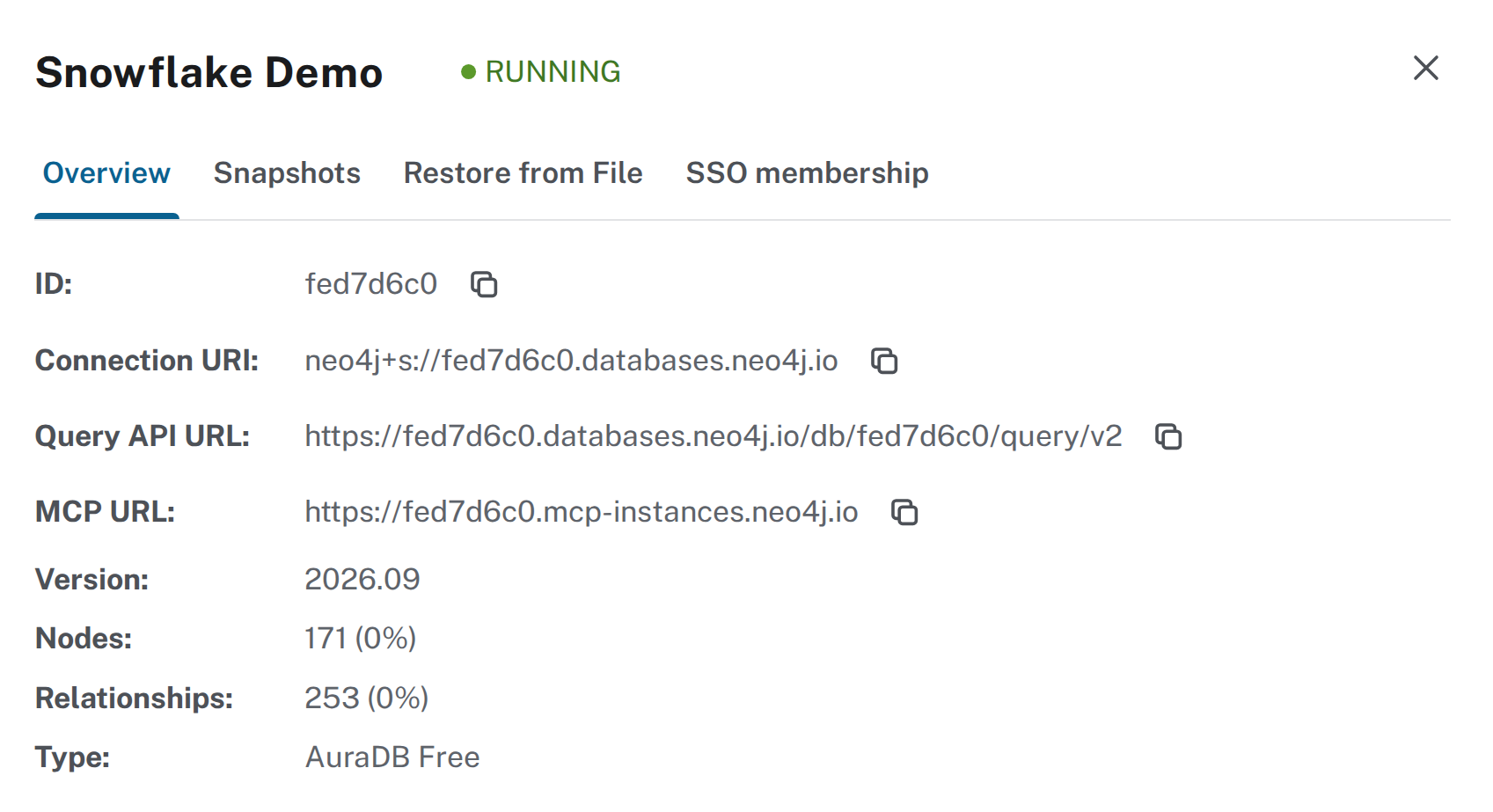
Open the … menu of your instance and click Inspect.
-
Copy the MCP URL from the Overview tab. It has the form
https://<INSTANCE_ID>.mcp-instances.neo4j.io. It is not the connection URI or the Query API URL.
2. Database
The next steps run in Snowsight at app.snowflake.com.
CREATE DATABASE NEO4J_MCP;3. API integration
Snowflake calls external MCP servers through an API integration. It defines which URLs Snowflake may call and how users sign in.
Replace <INSTANCE_ID> with your Aura instance ID:
CREATE API INTEGRATION NEO4J_AURA_MCP_INTEGRATION
  API_PROVIDER = external_mcp
  API_ALLOWED_PREFIXES = ('https://<INSTANCE_ID>.mcp-instances.neo4j.io')
  API_USER_AUTHENTICATION = (
    TYPE = OAUTH_DYNAMIC_CLIENT,
    OAUTH_RESOURCE_URL = 'https://<INSTANCE_ID>.mcp-instances.neo4j.io'
  )
ENABLED = TRUE;| Setting | Effect |
|---|---|
|
Makes it an integration for MCP connectors. |
|
Limits calls to URLs that start with the MCP URL. |
|
Snowflake registers itself with Aura’s authorization server. You don’t copy a client ID or secret. |
|
Snowflake reads the OAuth metadata from this URL to find where users sign in. |
The integration stores no credentials.
4. MCP server
CREATE EXTERNAL MCP SERVER NEO4J_MCP.PUBLIC.NEO4J_AURA_MCP
  WITH DISPLAY_NAME = 'Neo4j Aura'
  URL = 'https://<INSTANCE_ID>.mcp-instances.neo4j.io'
  API_INTEGRATION = NEO4J_AURA_MCP_INTEGRATION;
Agent Studio and CoWork show the server under its display name.
5. Agent
-
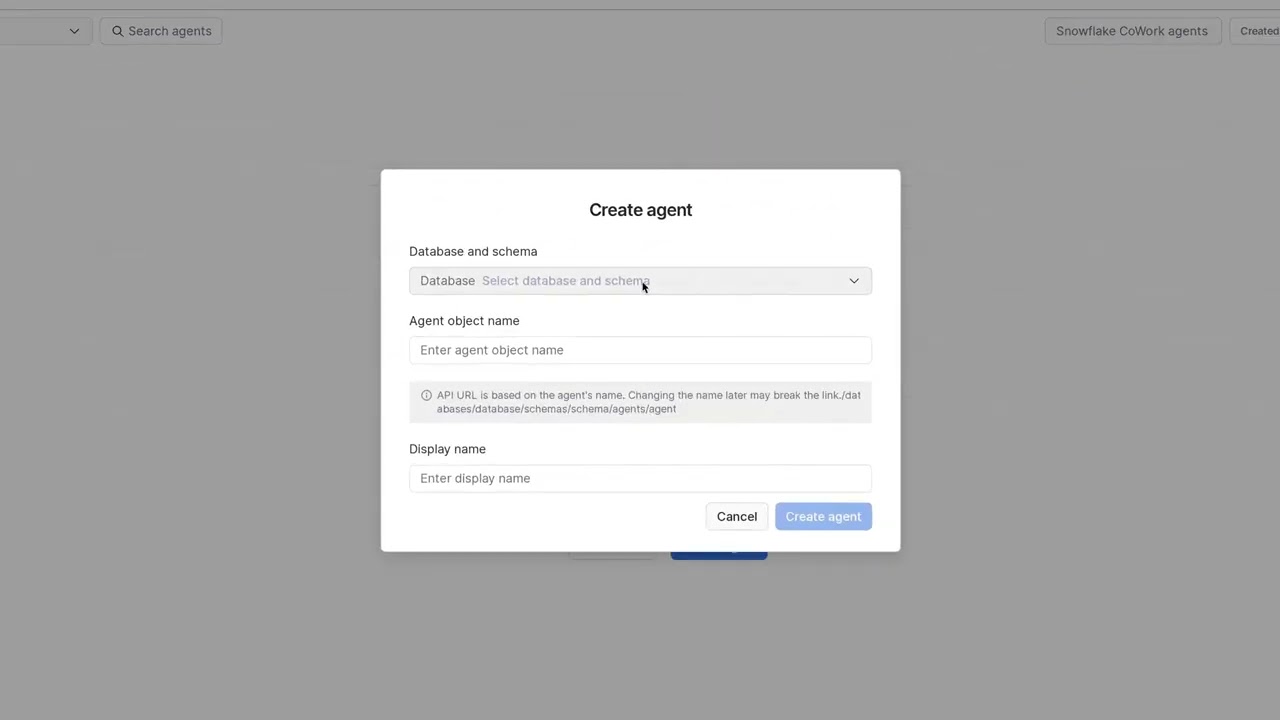
Go to AI & ML > Agent Studio and click Create agent.
-
Pick
NEO4J_MCPandPUBLIC. EnterNEO4J_MOVIES_AGENTas the object name andNeo4j movies agentas the display name. Click Create agent. -
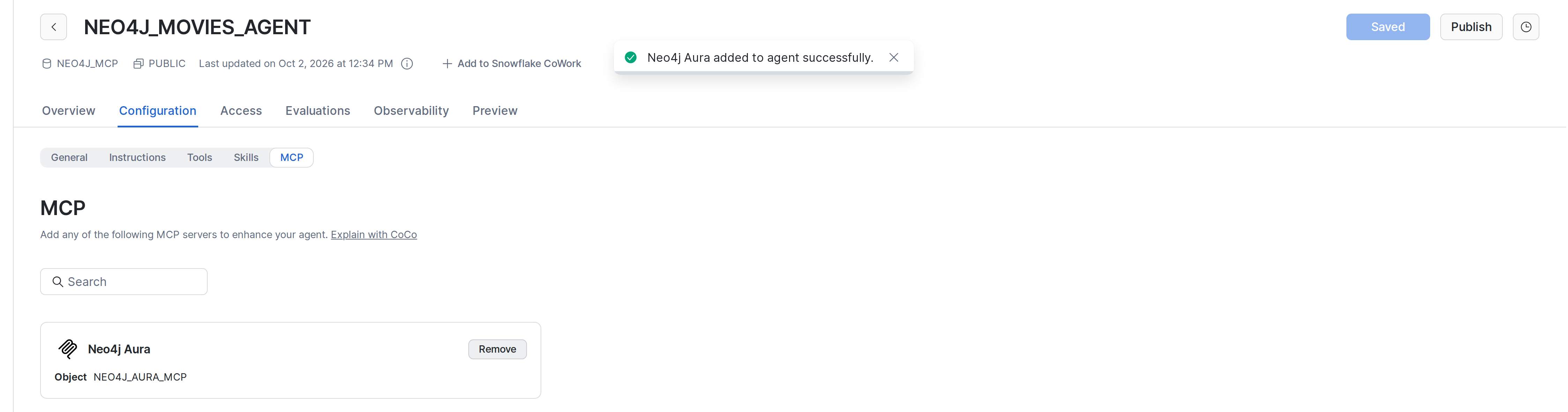
On the Configuration tab, open MCP. It lists every MCP server your role can use.
-
Click Add to agent on Neo4j Aura. This saves the draft.
-
Click Publish.
Or use SQL:
ALTER AGENT NEO4J_MCP.PUBLIC.NEO4J_MOVIES_AGENT ADD MCP_SERVER = 'NEO4J_MCP.PUBLIC.NEO4J_AURA_MCP';Roles other than ACCOUNTADMIN need these grants to use the agent. Each user of such a role still connects the server once, see 6. Connect.
GRANT USAGE ON DATABASE NEO4J_MCP TO ROLE <ROLE>;
GRANT USAGE ON SCHEMA NEO4J_MCP.PUBLIC TO ROLE <ROLE>;
GRANT USAGE ON WAREHOUSE <WAREHOUSE> TO ROLE <ROLE>;
GRANT USAGE ON AGENT NEO4J_MCP.PUBLIC.NEO4J_MOVIES_AGENT TO ROLE <ROLE>;
GRANT USAGE ON EXTERNAL MCP SERVER NEO4J_MCP.PUBLIC.NEO4J_AURA_MCP TO ROLE <ROLE>;
GRANT USAGE ON INTEGRATION NEO4J_AURA_MCP_INTEGRATION TO ROLE <ROLE>;
6. Connect
Each user connects the MCP server once, in Snowflake CoWork at ai.snowflake.com. Snowsight links to it under AI & ML > Snowflake CoWork.
-
Click Capabilities and open the MCP Connectors tab.
-
Click Connect on Neo4j Aura. Aura’s sign-in opens in a popup.
-
Click Continue with Neo4j Aura and sign in with your Aura account.
-
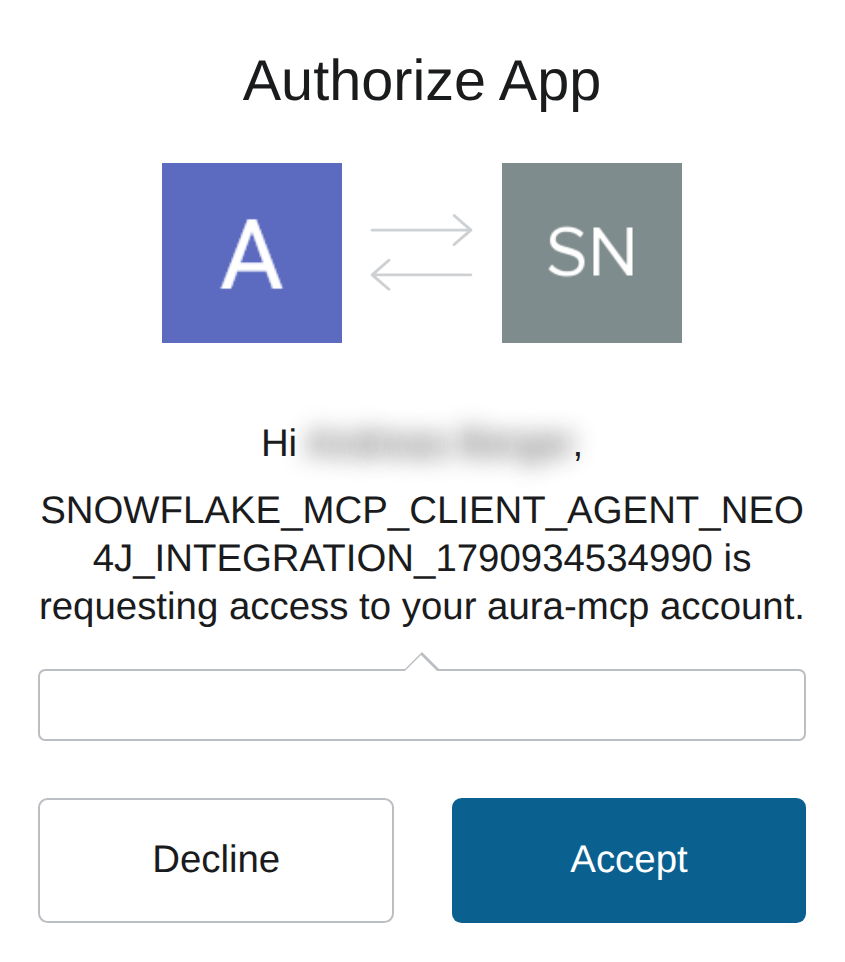
The first time you connect, Aura asks whether Snowflake may access your account. Click Accept.

Snowflake stores the token for your user only. Disconnect removes it.
7. Try it
In CoWork at ai.snowflake.com, click New chat, pick Neo4j movies agent and ask:
Which actors have worked with the most different directors?The answer names Tom Hanks with 10 different directors, followed by Keanu Reeves and Jack Nicholson.
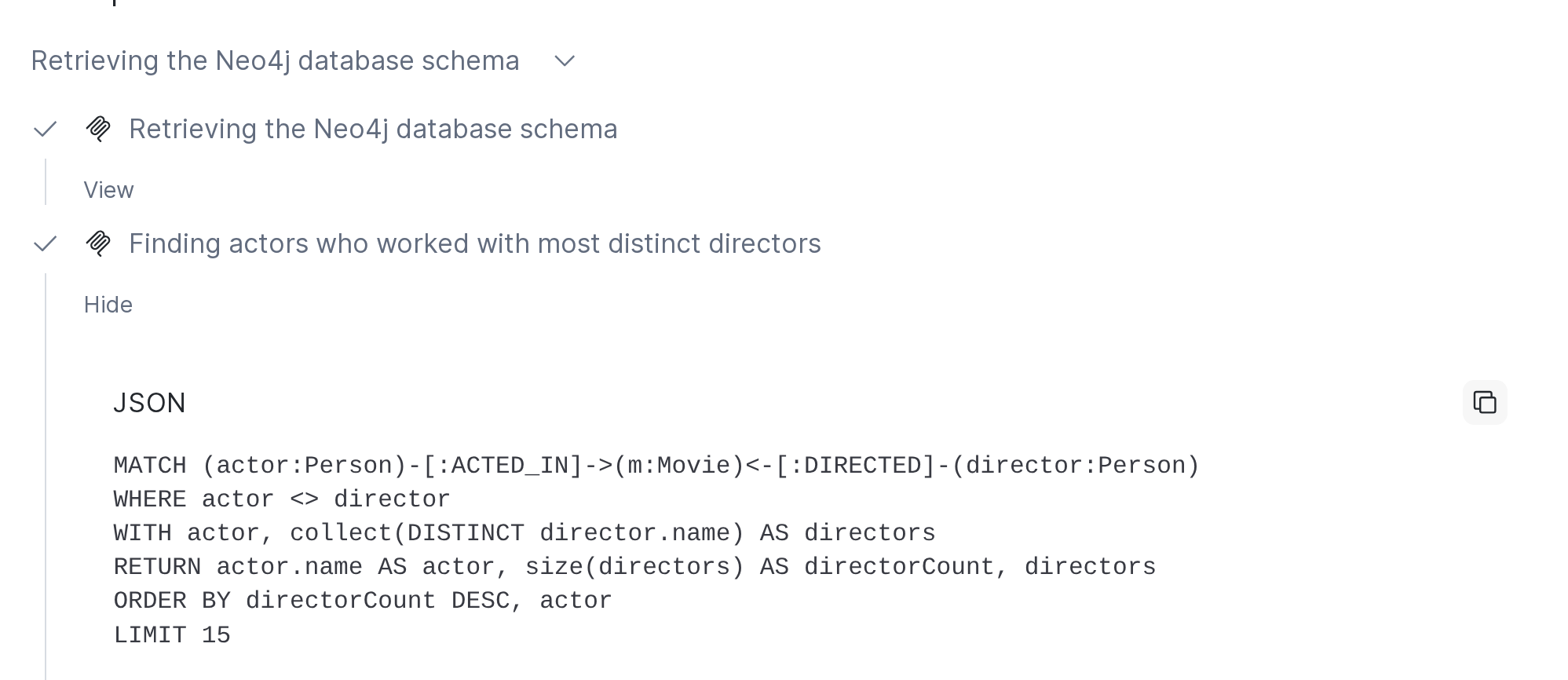
-
Click the line under the agent’s first sentence. It lists the MCP calls:
get-schema, thenread-cypher. -
Click View on the
read-cyphercall. It shows the Cypher the agent wrote from the schema.
MATCH (actor:Person)-[:ACTED_IN]->(m:Movie)<-[:DIRECTED]-(director:Person)
WHERE actor <> director
WITH actor, collect(DISTINCT director.name) AS directors
RETURN actor.name AS actor, size(directors) AS directorCount, directors
ORDER BY directorCount DESC, actor
LIMIT 10
The Cypher can differ from run to run, but the answer should stay the same.
Troubleshooting
| Symptom | Cause and fix |
|---|---|
The agent asks you to authenticate the connector |
The server is not connected for your user. See 6. Connect. |
|
Your role lacks |
The agent or the MCP server is missing for a role |
The role lacks one of the grants. See 5. Agent. |