Indexes and constraintsPreview
AuraDB Free AuraDB Professional AuraDB Business Critical
|
This feature is in preview and is offered AS-IS and should only be used for internal development purposes and not in production. |
When you generate a data model, constraints and corresponding indexes are created automatically to ensure the accuracy of data. They are found in the details panel and the tab is visible when a single node is selected in the data model panel.
Constraints
A key constraint is created on the node property selected as node ID. This ensures that the property is unique and not null and to achieve that, a corresponding composite range index is also created to support the constraint. You can change which property to use in the constraint, but not the constraint type and you cannot add any additional constraints. For more information on the key constraint see Cypher Manual → Create key constraints.
Indexes
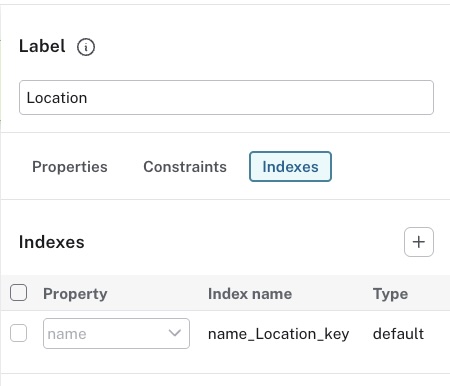
As mentioned previously, an index is created automatically on the assigned ID property for a node to support the key constraint. This index cannot be modified in any way from this tab, but if you change which property to use as ID, both the constraint and corresponding index change accordingly.
You can add more indexes with the + and then name a property to index from the dropdown menu.
If you know that you will regularly look at a specific property, it is good practice to add an index to that property.
Regardless of which property you add the index to, the index type is Neo4j’s default index, which is range for Neo4j latest version.
For more information on indexes, see Cypher Manual → Indexes.