Interactivity
When two people engage with the same dashboard, the subject remains the same, but the questions they ask and the perspectives they need may be different. Filters and parameters support these different perspectives by letting each person choose what they want to explore.
The mental model is:
-
Filter → collects a value.
-
Parameter → stores the value.
-
Dashboard widgets and Cypher queries → use the value.
The following table summarizes the relationship between filters and parameters:
| Filter | Parameter | |
|---|---|---|
What is it? |
A dashboard selector widget |
A placeholder with a value that can change |
What does it do? |
Lets a viewer set a parameter value |
Makes the supplied value available wherever the parameter is referenced |
Where does it appear? |
In the dashboard UI as a filter widget |
Mainly Cypher queries, and also card titles, descriptions, and markdown text. |
Filters
Think of a filter as a select component or a parameter setter with a UI that helps someone change the value of a parameter by typing or selecting values. Whatever value is in the filter input is passed to the parameter. So, other people can interact with the dashboard without having to directly edit a Cypher query.
Parameters
Dashboard parameters use the same concept as Cypher parameters. A parameterized query is a query in which placeholders are used and the parameter values are supplied at execution time.
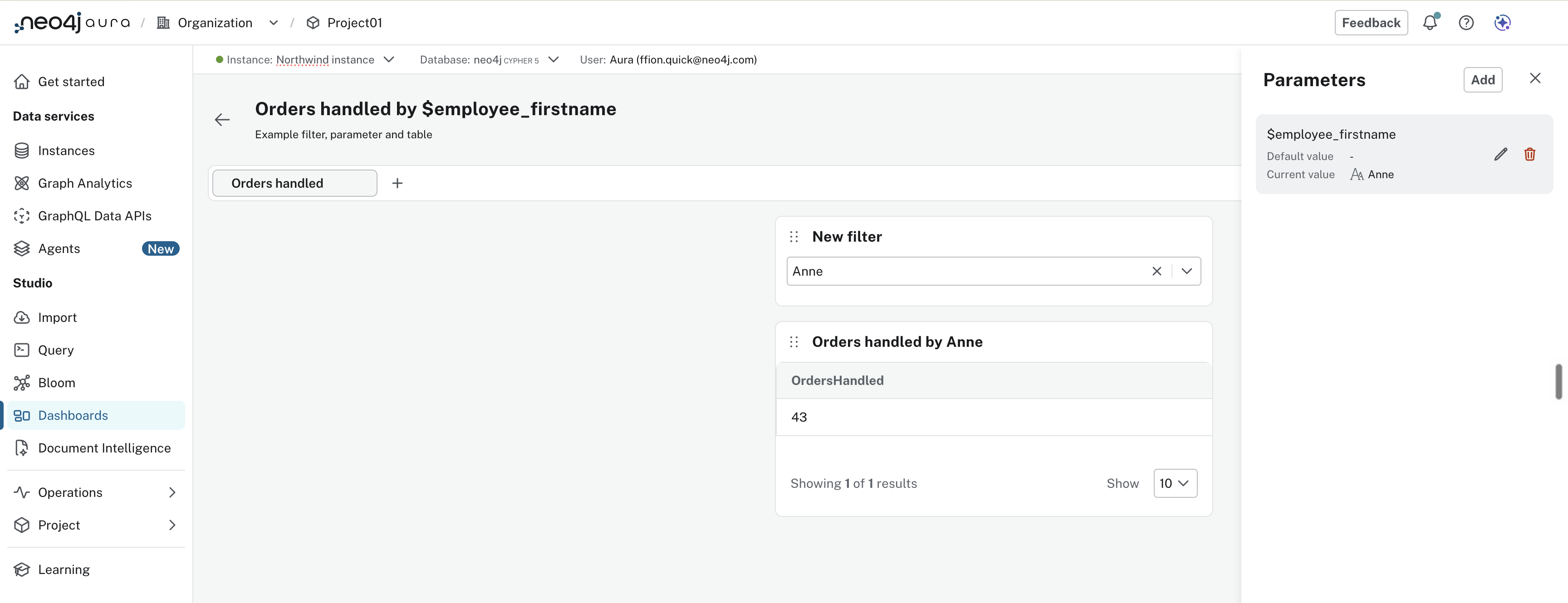
You can view parameter values in the parameter drawer. When adding or editing a filter, you see the parameter linked to that filter.
Example
Imagine you’re searching for an employee in the Northwind dataset.
You select Anne in a filter linked to the parameter $employeeName.
The parameter remains $employeeName only its value changes.
The dashboard then uses that parameter in two places:
-
The card title "Orders handled by $employee_firstname" reads "Orders handled by Anne"
-
The card query, which returns Anne’s order count.
MATCH (e:Employee)-[:SOLD]->(o:Order)
WHERE e.firstName = $employee_firstname
RETURN count(o) AS OrdersHandled
Select a different employee and both update automatically.